Hello, the program starts up and runs fine most of the time. But whenever I try to change the elevation, it would crash and ask me to send a report. Also, there are no planet surface features/maps when I zoom in to see them, i.e., you just see a shadow. I am having difficulty landing on a planet too. Please help.
Date
Votes
32 comments
-

Keiron Smith Official comment Here is the solution for both the crashing and the missing maps.
Take the Sky Data folder found here:
C:\ProgramData\Simulation Curriculum\Starry Night Prefs\SkyData"And merge it with the Sky Data found here:C:\Users\<UserName>\AppData\Local\Simulation Curriculum\Starry Night Prefs\Sky DataThen delete Starry Night Prefs found here:C:\ProgramData\Simulation Curriculum\Starry Night PrefsPlease let me know if this works for you.
-
Keiron Smith Hi CL,
Please provide the following information:
- The graphics card.
In Windows 10 ---> Right click on Windows Icon/Start button---> Go to "Run" ---> type "dxdiag" in the search field and hit return. ---> On the DirectX panel that opens up look under the Display tab for "Device" <--- what it says here will be the graphics card.
In Window 8 ---> Press the Windows Key + R ---> Enter "dxdiag" in the text field and hit OK---> On the DirectX panel that opens up look under the Display tab for "Device" <--- what it says here will be the graphics card.
In Windows 7/Vista ---> Start ---> In the Search Program and Files text window type "dxdiag" and hit return. ---> On the DirectX panel that opens up look under the Display tab for "Device" <--- what it says here will be the graphics card.
- System Information.
In Windows 10 ---> Right click on Windows Icon/Start button---> Go to "Run" ---> type "dxdiag" in the search field and hit return. ---> On the DirectX panel that opens up look under the System tab for "Operating System" <--- what it says here will be the OS info. Note if its Pro, Home, etc. Also, and 32 or 64 bit.
In Window 8 ---> Press the Windows Key + R ---> Enter "dxdiag" in the text field and hit OK---> On the DirectX panel that opens up look under the System tab for "operating System" <--- what it says here will be the OS info. Note if its Pro, Home, etc. Also, and 32 or 64 bit.
In Windows 7/Vista ---> Start ---> In the Search Program and Files text window type "dxdiag" and hit return. ---> On the DirectX panel that opens up look under the System tab for "operating System" <--- what it says here will be the OS info. Note if its Pro, Home, etc. Also, and 32 or 64 bit.
- The manufacturer and model of your computer (additional model information may be found on a sticker under your computer)
In Windows 10 ---> Right click on Windows Icon/Start button---> Go to "Run" ---> type "dxdiag" in the search field and hit return. ---> On the DirectX panel that opens up look under the System tab for "System Model" <--- what it says here will be the model info.
In Window 8 ---> Press the Windows Key + R ---> Enter "dxdiag" in the text field and hit OK---> On the DirectX panel that opens up look under the System tab for "System Model" <--- what it says here will be the model.
In WIndows 7/Vista ---> Start ---> In the Search Program and Files text window type "dxdiag" and hit return. ---> On the DirectX panel that opens up look under the System tab for "System Model" <--- what it says here will be the model.
Thanks!
-

CL Hello Keiron,
Here is the information requested:
Graphics card: AMD Radeon HD 5800 Series (to be exact, it's Radeon HD 5870 with 1GB memory)
OS: Windows 10 Pro 64-bit (10.0, Build 15063)
System Model: Dell Studio XPS 7100 (AMD Phenom II X6 1055T 2.8GHz with 8GB memory)
Many thanks,
CL
-
Keiron Smith Hi CL,
In File ---> Preferences ---> Shaders ---> Use Advanced Hardware <--- is this on? If not, turn in on.
What happens?
-
CL Hi Keiron,
Yes it's on. I just tried to go to Venus and the program crashed again. I have clicked on "Send report" and I assume you will receive it?
CL
-
Keiron Smith Hi CL,
- Open SN7.
- Turn Use Advanced Hardware OFF.
- Go to Venus. You just see a shadow, correct?
- Turn Use Advanced Hardware ON.
What happens?
Thanks!
-
CL Hi Keiron,
There is no difference whether I turn Advanced Hardware on or off. Venus is just a big round dark shadow. :(
CL
-
Keiron Smith Hi CL,
In Help >>> About SN7 >>> What version is it? 7.X.X.xxx?
-
CL Hi Keiron,
It's 7.5.8.1249.
Thanks,
CL
-

Byron Harding I upgraded to SNPP7 7 days ago, and I have the same problem. No surface features on any planets or stars. Just grey outlines. I have updated my graphics display driver to the latest ver, and I have re-installed SNPP7, and I've tried the "turn off advanced hardware" and turned it back on again, and still I get just blank grey outlines. One thing I did do is to download and install all data files locally. Not sure if I should re-install without local data files, so these are streamed online instead. But I'd prefer them locally. Please advise.
Here are my details :
Graphics: Intel Graphics 4000. Latest available driver (10.18.10.2653)
OS: Windows 10 Pro 64 bit (10.0 latest available build 14393)
System Model: ASUS Zenbook UX32A
SNPP7: latest available version (7.5.8.1249)
-
CL To add to Byron, I also downloaded all data locally (from a clean installation) and updated to the latest AMD driver.
-
Keiron Smith Hi Guys,
When you look in Help >>> Check for application updates >>> do you see an update available for 7.6.0.1299?
Thanks for your patience!
-
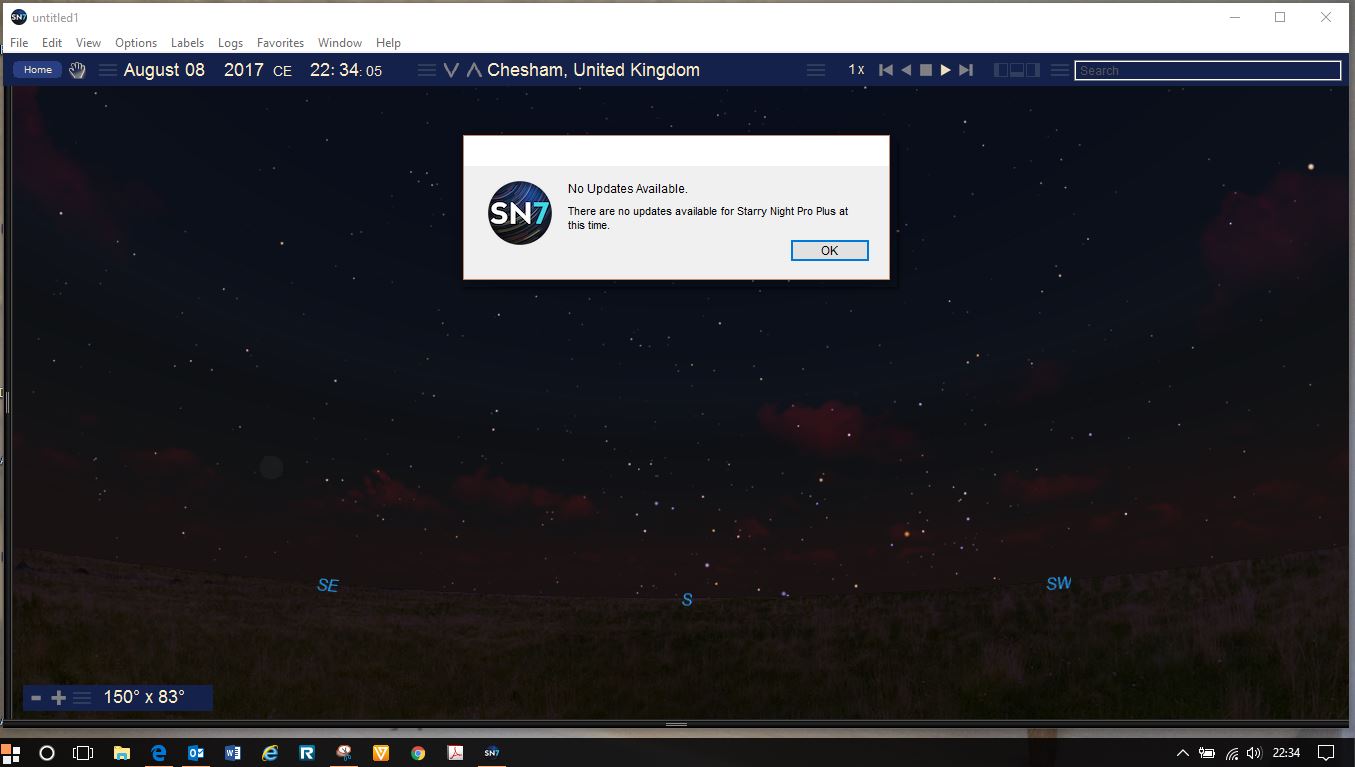
Byron Harding Hi Kieron, Unfortunately not. I am still on version 7.5.8.1249.
When I go to Help > Check For Updates, I get the message "There are no updates available for Starry Night Pro Plus at this time".
I attach a screenshot.
-
Keiron Smith Thanks for the screenshot! Okay, so there may be two separate issues here.
- Missing planetary maps.
- No update
It's possible the issues are connected, but can't say at this time.
Please tell me the following. Both of you said you "tried" to install ALL the (offline) data files. Was this option during the install of ALL data (the Complete option) what you chose initially when you very first installed SN7? Or, was this a secondary option you tried after finding the planetary maps were missing? So, to ask again, which of the following options did you choose for the very first install of SN7. You get two choices during the installation:
- Typical
- Complete
Thanks!
-
Keiron Smith Nevermind. It was the Complete option chosen during the initial installation. We have reproduced the issue and will have a fix in the 7.6.1 update.
Now, about the 7.6.0 update, that is a separate issue. You guys won't get the 7.6.0 update - instead you will go straight to 7.6.1. I'll let you know when it's ready and released.
Thanks!
-
CL Hi Keiron,
I recall I individually checked all boxes (to be installed locally) when I installed SN7 for the very first time.
Thanks,
CL
-
Byron Harding Hi Kieron. For me, I chose "Custom Installation" instead of "Typical Installation". It then gave me the option to select "local installation" of planetary data files and all-sky data files, instead of the default option of accessing the data files over the internet connection when needed. Then it took a while to download a few gigabytes of data, and it seemed to complete the installation without any errors. Byron
-
Byron Harding Also, I saw your latest email saying that you have managed to reproduce the problem, and are now working on a 7.6.1 update, and you will let us know when it is ready. Thanks! Byron
-
CL Glad that you have found the problem. Looking forward to the update. Thanks!
-
Keiron Smith The Pro Plus update to 7.6.1. should now be live. Please check to see whether you can get updated now.
The Pro update to 7.6.1 is not yet live. I will post here when it is.
Thanks!
-
Keiron Smith Note, the 7.6.1 update does not have the fix for the missing planetary maps. I will post a fix for that here shortly.
Thanks!
-
Byron Harding I've installed the 7.6.1 update. I now see the new 2017 eclipse pop-up window on launch, but as you say, the planets are still only grey outlines. Looking forward to a fix for that. :-) Thanks, Byron
-
CL Thanks for the notice, Keiron. I updated to 7.6.1 and saw the changes. However, please note that it still crashes on me when I try to change the elevation and I am not sure whether it is related to the planetary maps problem. Thanks!
-
Keiron Smith CL does SN7 crash when you "Go There" as well? Or, only when using the elevate button?
-
CL It would also crash when I "Go There".
-
Byron Harding Just to let you know. I haven't used the "change elevation" or "go there" operations until just now, but I can confirm that when I select either operation, it causes my SNPP7 installation to crash. I also notice that after the upgrade to 7.6.1, the SNPP7 icon no longer appears on my shortcuts, and it is replaced with a generic Windows icon. A minor issue that I fixed by manually changing the icon back to SNPP7 by navigating to the SNPP7 program folder. Byron
-
CL It worked for me! Thanks a lot, Keiron.
By the way, sometimes I still see SN7 "streaming files" even though I installed all data locally. May I know what files are being streamed?
-
Keiron Smith Stars will always be streamed. There is too many to install all at once. It the "infinite" organized, after all :)
-
Keiron Smith However, you get a huge catalog up to 15th magnitude installed by default. But, beyond that, we're streaming.
-
CL Got it. Thanks again for solving the problem. Now time to enjoy the sky. :)
Please sign in to leave a comment.