I'm inputting some old observations today and I noticed something strange. When I create a new observation, and go back to a date, let's say December 2, 2015 at 9pm. If I input that date/time manually into either the start time or the end time, then put the same time in the other time field (start or end), it changes the one I input first. It doesn't seem to matter if I start with start time or end time. This is very annoying, as I put in the start time, put in the end time to match, then have to fix the start time again, and once or twice I think I've had to go back and fix the end time a second time. I'm using a Samsung Galaxy Tab S2 with Android 7 and, unfortunately, still on Pro 6.0.4.34. I checked on my phone, which has the newest version, and the problem also exists there.
10 comments
-

Chris Any update on this?
-

Bill Tschumy Chris,
I haven't been able to reproduce this. When you say it changes the one you input first, what does it change it to? If you can give me explicit instructions on how to reproduce then maybe I can figure out what is happening.
-
Chris Click an object
Selection > Create New Observation
Click Started at
Rewind Month to December
Rewind Year To 2014
Rewind Time to 1:00pm
Go back to Observation Details
Click Ended at
Rewind Month to December
Rewind Year to 2014
Rewind Time to 1:00
Go back to Observation DetailsWhen I do those steps, for example, I do not get a start and end time that match, they're off. I'm not sure why. If I reverse the above and start with the End Time, the Start Time actually gets closer on its own and I can easily adjust it to match. Other times I've had a lot of trouble getting these to match, having to go back and forth at least 3 times as described above.
-
Bill Tschumy OK, I can reproduce this. It seems to be a Daylight Saving Time issue. If the current time is DST but you set the observation time to a month that is not DST, it sets the time an hour off. I think this causes other thing to go wrong as well. I'm surprised this hasn't been found previously but I will get it working before shipping the new version.
Man I hate DST. It causes all sorts of subtle problems.
-
Chris Yeah, I'm seeing lots of things, depending on what I do, that are going wrong, and maybe they're all caused by this DST thing. I'm seeing times not matching by 1 minute, 45 minutes, 46 minutes, an hour, times showing different when displayed on the observation screen versus when you click on it and get the time popup. I guess not enough people have gone back and put in lots of old observations?
-
Bill Tschumy I have fixed the DST problems.
Well, maybe I'm not seeing your problem. In all cases, before my fix, the times were only off by 1 hour from what they should be. Now they are correct. I never saw times off by some number of minutes. Do you see this when following your instructions above? Can you give me a sequence of steps to demonstrate this non-hour mistake in time?
-
Chris Selection > Create New Observation
Click Started At
Click down on year to 2014
Click up on time to 4pm using minute + button
Go back to Observations
Click Ending Time
Click down on year to 2014
Click up on time to 4pm using minute + button
When I do this, I now see start time of 3:48pm and end time of 4pm. -
Chris 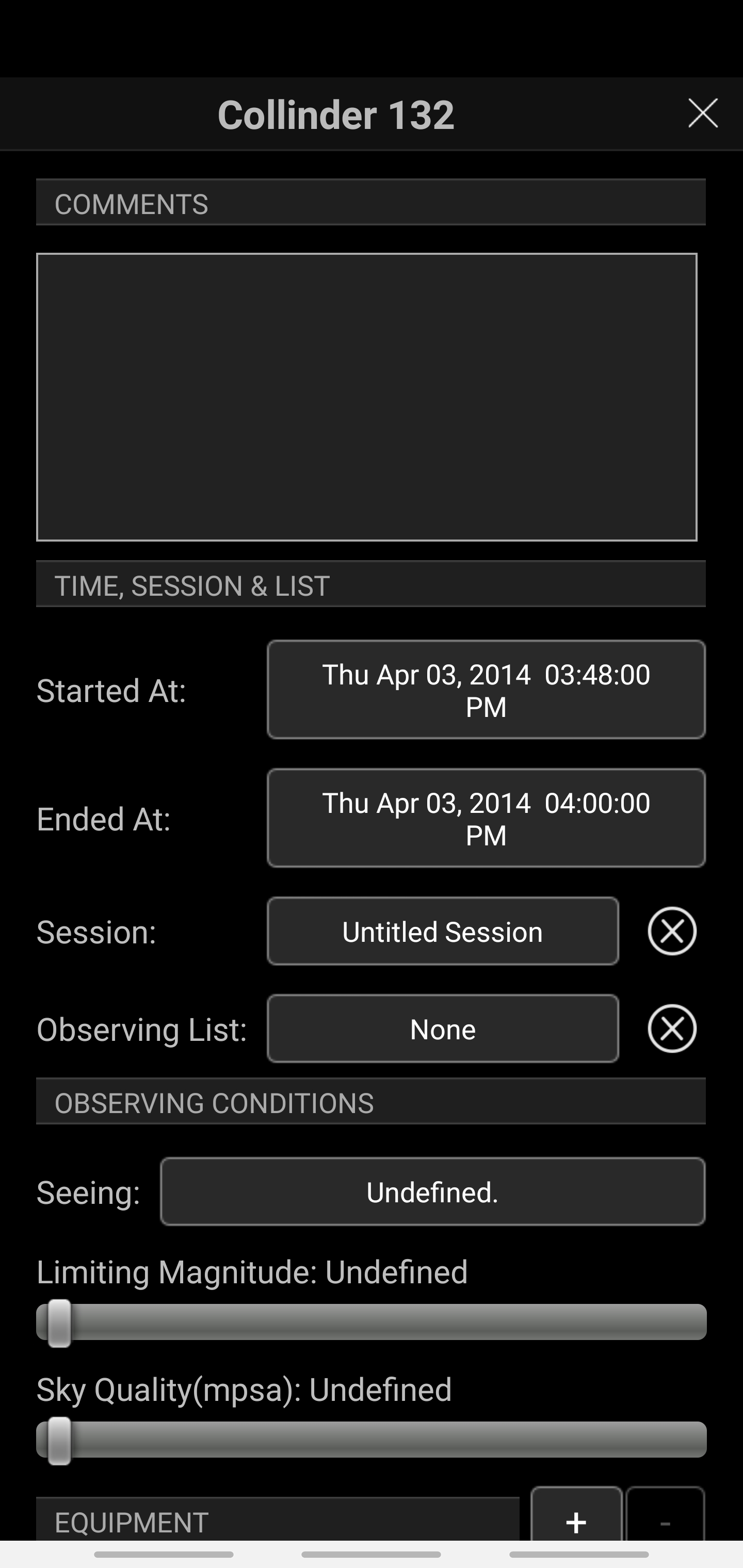
-
Bill Tschumy Thanks, I do see this. It only happens on Android and seems fine on iOS and Mac. I will get it fixed. Sorry for the problems.
-
Bill Tschumy OK, this was a rounding problem that the Android time/date picker doesn't handle very gracefully. It only happens in certain time ranges which is why I didn't previously notice it in earlier testing. I believe I have it fixed. Thanks for pointing this out.