
At 21:45 UTC on April 13, 2029, asteroid 99942 Apophis will be about 38,011 km from Earth’s center. That puts it roughly 31,600 km above Earth’s surface. If your copy of Starry Night shows Apophis hundreds of thousands of kilometres away, you can reproduce the close pass by adding a second asteroid entry with NASA/JPL’s orbital elements for the flyby. JPL Horizons distance at 21:45 UTC
What we found. In our Starry Night Pro Plus 9 test, the built-in Apophis entry used orbital elements dated January 17, 2019. It showed 603,362 km at the flyby time, even after the data updater reported that all files were current. With JPL’s flyby-time elements entered in a new asteroid record, Starry Night showed 38,017 km at the same instant — within 6 km of JPL.
Which editions can do this? The steps below use the Orbit Editor, included in Starry Night 7 and 8 Enthusiast, Pro, and Pro Plus. With the same elements and time, these editions should show a distance of about 38,000 km. The screenshots and exact measurement below come from SN9. The Complete Space & Astronomy Pack (CSAP) editions lack the Orbit Editor. SN7 edition comparison · SN8 edition comparison
1. Add a flyby entry for Apophis
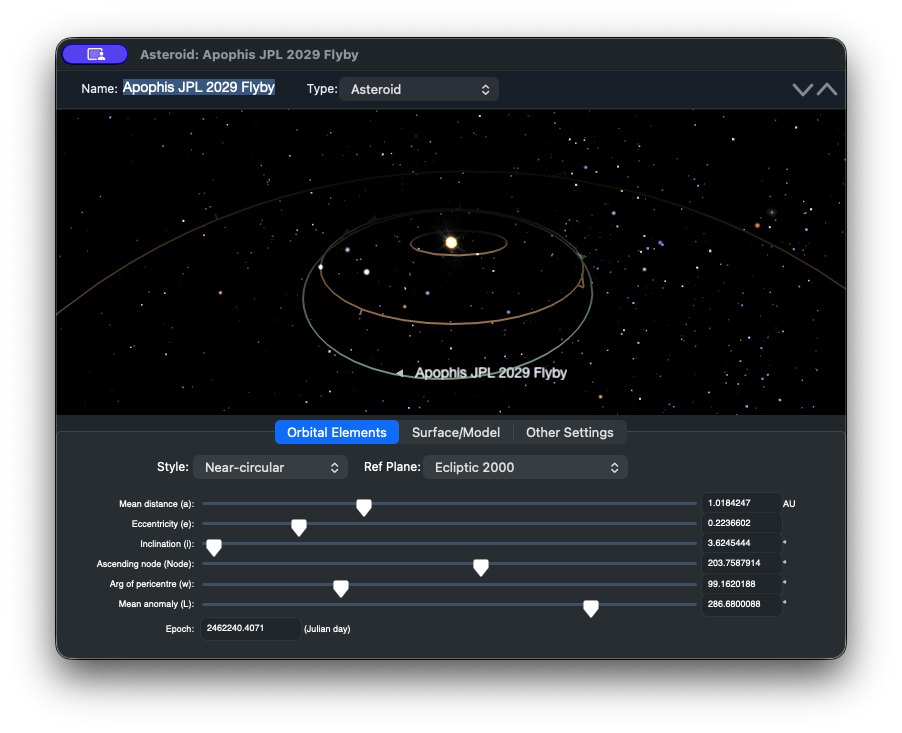
Choose File → New → New Asteroid Orbiting Sun. Name it Apophis JPL 2029 Flyby so you can find it alongside the original catalog entry.
On the Orbital Elements tab, choose Near-circular for Style and Ecliptic 2000 for Ref Plane. Copy each value into the matching field, then close the editor and choose Save. The editor may display fewer decimal places when you reopen it. JPL Horizons orbital elements used in this test
| Orbit Editor field | Value to enter |
|---|---|
| Mean distance (a), AU | 1.018424654475871 |
| Eccentricity (e) | 0.2236602253182318 |
| Inclination (i), degrees | 3.624544359841960 |
| Ascending node, degrees | 203.7587913810549 |
| Arg of pericentre (w), degrees | 99.16201875029923 |
| Mean anomaly (L), degrees | 286.6800088399349 |
| Epoch (Julian day) | 2462240.40705076 |
2. Set the clock and check the distance
- Pause the simulation. Set the date to April 13, 2029, and the time to 21:45:00 UTC. If your clock shows local time, use the equivalent for your viewing location. In Toronto or New York, that’s 5:45:00 p.m. EDT.
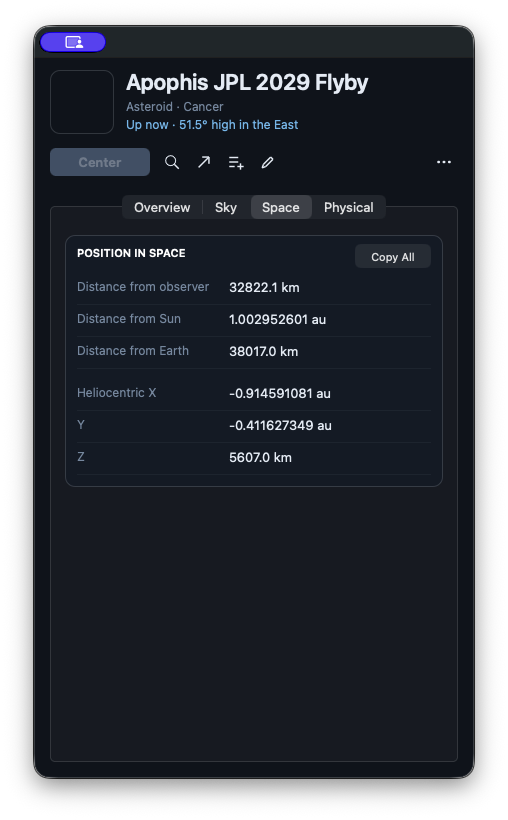
- Search for the full name Apophis JPL 2029 Flyby. Right-click the result and choose Show Info.
- Under Position in Space, read Distance from Earth. That’s the figure to compare with JPL’s 38,011 km. Distance from observer measures from your selected viewing location. In our Toronto simulation, those two lines read 38,017.0 km and 32,822.1 km, respectively.
Use this entry for the flyby itself. Earth’s gravity bends Apophis’s path during the encounter. These elements describe its orbit at the specified instant. To check its position on a different date, request fresh elements from JPL Horizons for that date.