|
I have some simple improvement suggestions that you should really consider: 1. be able to change language in the app settings 2. It would be really nice to see FOV and Mag data displayed together with the telescope configuration in the star map or at least able to choose to display this additional information 3. add more FOV configurations, today it is limited to only 5 4. I can display only one coordinate system at the time, it would be nice to be able to display more than one at the same time 5. telescope alignment with the app has been a real pain (Celestron SCT with Skyportal WIFI Module). Please add an overview of the alignment stars that should also be editable. Today when I make a mistake in the alignment process, it is not possible to delete or correct it, I have to start all over again with "connect and align".... and with touch panels in the dark and gloves it is veeeeery easy to make lot of mistakes.... I would like to hear from you, thanks PS. I have the german version of Skysafari so my translation of german App functions may not coincide with the App english version |
Date
Votes
18 comments
-

Bill Tschumy Thanks for your suggestions. My comments are numbered below.
1. I wouldn't call changing the language a "simple" suggestion. This is a huge task. We have been slowly working towards this goal over the past 6 months. Right now we are localizing the SkyPortal app, but most of the changes should carry over to SkySafari.
2. I'm not sure what you are asking for. The FOV of the chart is already displayed in the upper right. You can see the magnitude limits (stars and DSO) by tapping the blue "center coordinates" label in the upper left. We really cannot clutter the screen with additional information since it has to work on small devices.
3. How many do you need?
4. Do you really mean coordinate system, or the coordinate grid? The screen would be terribly messy with an Alt/Az grid and a Equatorial grid displayed together (not to mention Ecliptic and Galactic grids. Sorry, I just don't see this happening.
5. This was designed by Celestron and it works the way they wanted. You will have to request a change from them.
-

Msebes Thanks for your fast reply
1. ok
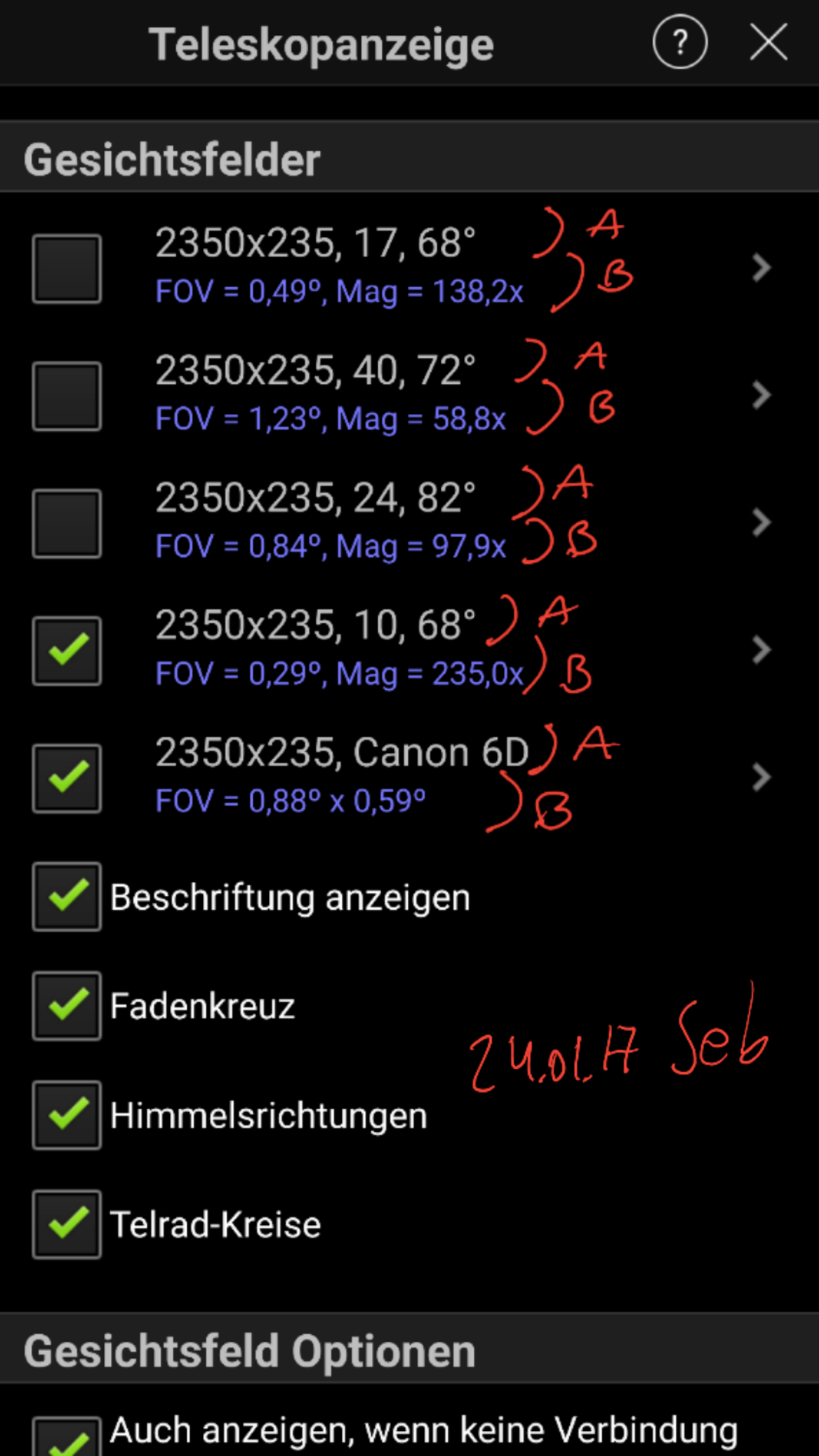
2. In the upper right is the FOV of the complete screen. I mean the FOV of the reticles (round or square if camera) I have activated in the telescope setup, also from the telrad reticles
3. 10 would be good. I would not activate all at the same time cause it would be a mess on the screen. I have a standard basis of 5 configurations that never change. If I want to test new configurations, today I must delete my standard configurations because there is no more space available
4. I meant coordinate grid. I would like to see Alt/Az + Eq displayed together, it may be a mess, but everybody could decide and activate what they want to see....
5. is the alignment process different with the SkyFi 3 adapter ? does it have an editable overview of the alignment stars ?
-
Bill Tschumy 2. So you would like the FOV indicator in the chart to be labelled with the actual field of view? It does do this for Custom Fields of View, but not when it is based on the equipment. I can think about this, but again I worry about screen clutter.
5. With SkyFi 3 you do your alignment using the hand controller in most cases. For Push-To encoder systems we do implement our own multi-star alignment routine. NO, it this case you cannot edit your alignment stars. I don't think anyone has ever asked for this before.
-
Msebes 2. I have attached two edited screenshots for easier understanding. I mean to be able to show A or B or A+B on the star view.
You can also see there my 5 basic configurations (point 3.) If I want to test some new configuration I have to delete some entry of my basic configuration and at the end type it over again, thererfore to have more configurations would be nice

-
Bill Tschumy OK, your suggestions have been recorded. We will consider them when we next revisit this part of the UI. Thanks.
-
Bill Tschumy I'm very surprised to see the screen in German. We have been working with Celestron to localize SkyPortal, but SkySafari is not ready yet. It seems we might have accidentally release a version with partial localization. I assume you are seeing some UI elements that are not in German? We are going to be releasing a new SkySafari in the next week. It will probably not have this German localization you are seeing.
-
Msebes You are correct. Some elememts of the UI are in english.
To 4. The reason for displaying Alt/Az + Eq gids together is following. When looking at a sky potion in the app, with Eq grid it is possible to see in which direction the objects are moving und with the Alt/Az grid it is possible to see how high above the horizon the objects are or will be.
To 5. In the online manual under "Notes on alignment" the last sentence "When given the option, align on the star as the "First Star". That will reset SkySafari's alignment process and start it over with the star you just selected". Selecting "align" and then "First star" is not possible, there is no "first star" option. Everytime I press align it will try to add a new alignment star. To reset the alignment I have to disconnect from telescope and select "connect and align".
-
Bill Tschumy You need to give me some more information. I assume you are connecting to a "Celestron Wi-Fi" scope? That is where yo see the Connect & Align".
I assume you are referring to this part of the manual:
===============================================
Note: for encoder-based "Push-To" systems, like the Tangent Instruments BBox, Celestron Astro-Master, JMI NGC-MAX, and Orion Intelliscope, SkySafari now lets you perform a 2-star alignment. This eliminates the need to level your telescope mount base. Simply set up your telescope, point it at the first alignment star, select that star in SkySafari, and tap "Align". Repeat the process with a second alignment star, choosing "Align" rather than "Restart Alignment" when asked. Your encoders should now be aligned to the sky. You can continue to align on additional second stars; but SkySafari only uses the two you most recently aligned on. If you want to forget the pervious alignment stars and align as your first star, choose "Restart Alignment".
Make sure your two alignment stars are at least 10 degrees apart; 90 degrees apart is ideal. SkySafari will warn you if your alignment stars are too close together, or if their positions don't match - for example, if you've accidentally selected the wrong alignment star in SkySafari, or you're not really pointing the telescope at that star in the sky.
SkySafari remembers the telescope's alignment until you quit the app, so you should not have to realign if you disconnect (or are accidentally disconnected) from the encoder control box. However, if you accidentally kick the telescope mount, or otherwise destroy your alignment, you can realign without having to quit SkySafari. To start over, point the telescope at a star, select the same star in SkySafari, and tap Align. When given the option, align on the star as the "First Star". That will reset SkySafari's alignment process and start it over with the star you just selected.
===============================================
That whole section is just for Encoder-based Push-To scopes. It is the case that in the last paragraph, the reference to "First Star" should say "Restart Alignment". The "First Star" wording was for an earlier version of SkySafari.
-
Msebes Yes it is Celestron WIFI Scope.
There is no "Restart Alignment" option in the UI. I just have to disconnect and choose "Connect and align" again to be able to restart the alignment process
-
Bill Tschumy That is the way Celestron designed this feature. I don't see that as a large burden. It is only one more tap.
-
Msebes You are right, it is not a burden when you have discovered how to reset the alignment after many trials and errors, but you first have to find out how to do it becuase it is not obvious, and it doesnt show up in the manual this way... a "restart or reset alignment" button would be better and self explanatory...
Please dont misunderstand me, I am not trying to be negative and criticize the software, on the contrary I reallly like it, I am just a power user trying to make some useful suggestions...
-
Bill Tschumy OK, thanks for the suggestions. I will take this up with Celestron. I will also consider your other requests.
-
Msebes Bill, yesterday I had a nice clear cold night and I have spent 2 precious hours to get an alignment. It was impossible to finish the 4 star alignment completely because I lost the wifi connecting in some part of the process everytime. When I was able to reconnect I had to start the alignment from the very beginning because the app did not remember the 1, 2 or 3 stars that have been aligned. I dont know where the technical Problem of my connection was, but I am sure I will not be the first nor the last person. The point is, it would be really healpfull if the app could remember the partial alignment that has been done, and to be able to continue the process where it was after reconnecting.
-
Bill Tschumy You should talk to Celestron about the dropping of the signal. This is outside our control. I know they have replaced some defective units.
-

Jim Gallt I, too, find myself wanting more than five "preset" configurations for FOV. I use SS for visual, photography using 2 different scopes, and photography using various lenses on a DSLR. Thanks for considering this.
-
Bill Tschumy Jim,
It seems like you responded to the wrong posting. This thread has nothing to do with the number of FOV's you can define. Nevertheless we will consider adding more.
-
Bill Tschumy Oops, looking back at the original posting, there was a request (#3) to have more FOVs that can be defined.
-

Robert Nielsen Bill,
I think the number of FOVs that you display is a good amount ... per setup. But if you have multiple possible combinations of mounts and OTAs and then add the possibility of using a camera instead if eyepieces, it probably isn't enough, And yes, this is something only SERIOUS amateur astronomers would do ... have multiple telescopes ... but isn't that what the Pro version of SkySafari is for?
Perhaps a good solution to this would be to allow the user to define and select scope *setups* ... e.g., I'm using my reflector now (the one on the heavier mount) ... and then have the FOV definitions be per setup. Yeah ... it adds a single level of complexity ... but it is probably doable both in the UI and the configuration files, right?
Robert
Please sign in to leave a comment.