New post
0

Starry Night Pro Plus 7 - Star magitudes limit not working

Starry Night Pro Plus 7
Windows 10
Changing the Star Magnitude limits. The stars dim but are still left as a small spot. In my older copy of Pro 6 they disappear completely as I would expect.
The background sky remains confused with a large number of unnamed stars.

Is there a solution?


7 comments

  • Avatar
    Keiron Smith Official comment

    Hi Ken,

    Please try the following:
    1. Click the Home button.
    2. Set the Time to 12:00am (or thereabouts)
    3. Uncheck all the Planet-Moons and Deep Space/Other star databases in the Options (side panel) - everything except for the Stars ----> Stars options.  Make sure all the databases under Deep Space and Other are all unchecked.
    4. Click on the word "Limit by magnitude" to bring up the "Limit stars by magnitude" options.  For this example, choose the same settings that I have = 7.95 <---> 8.00.
    5. Click on the word "Stars" to bring up the "Number of stars" submenu.  Slide the slider to the right ---> More/slower.
     
    The night sky should look black.
     
    1. Zoom in to about 10x5.  You should see some stars.  
    2. Take the mouse/cursor, and hover over any star.   
    The result: You should find that every star you can see has a magnitude that falls within the range that we have defined.
     
    1. Zoom in and out.  You should not see additional stars added to or subtracted from the range of visible stars
    2. Click on the word "Stars" to bring up the Stars submenu.  Slide the slider to left - Fewer.  The visible stars in this range become dimmer/fainter.
     
    See the video to reproduce my example: https://youtu.be/EKx63ejvyp0
     
    Note, the video uses V6 is an example, so the UI is different, but the process will be the same in V7.
     
    Now, please let me know if you can reproduce the video, and if not, please tell me at what point you encounter difficulty.
     
    Thanks!
  • 0
    Avatar
    Ken Brooke

    After zoom in.

    Field still shows many stars and the background of stars which I take to be the All-sky CCD mosaic.

    Details of the stars in the selected magnitude range appear when selected. - no details are displayed for the others. 


  • 0
    Avatar
    Keiron Smith

    Hi Ken, 

    Step 3 says:

    Uncheck all the Planet-Moons and Deep Space/Other star databases in the Options (side panel) - everything except for the Stars ----> Stars options.  Make sure all the databases under Deep Space and Other are all unchecked.  

    So, please make sure All-Sky is off too.

    That said, I'm not following the issue as you describe it.  Please understand that in order to discern the problem here we need to be very precise about what we are talking about, and what we are doing.

    Please feel free to upload images, or link to a video (that shows the issue), or put forward a more comprehensive description of the issue.

    Thanks!


  • 0
    Avatar
    Ken Brooke

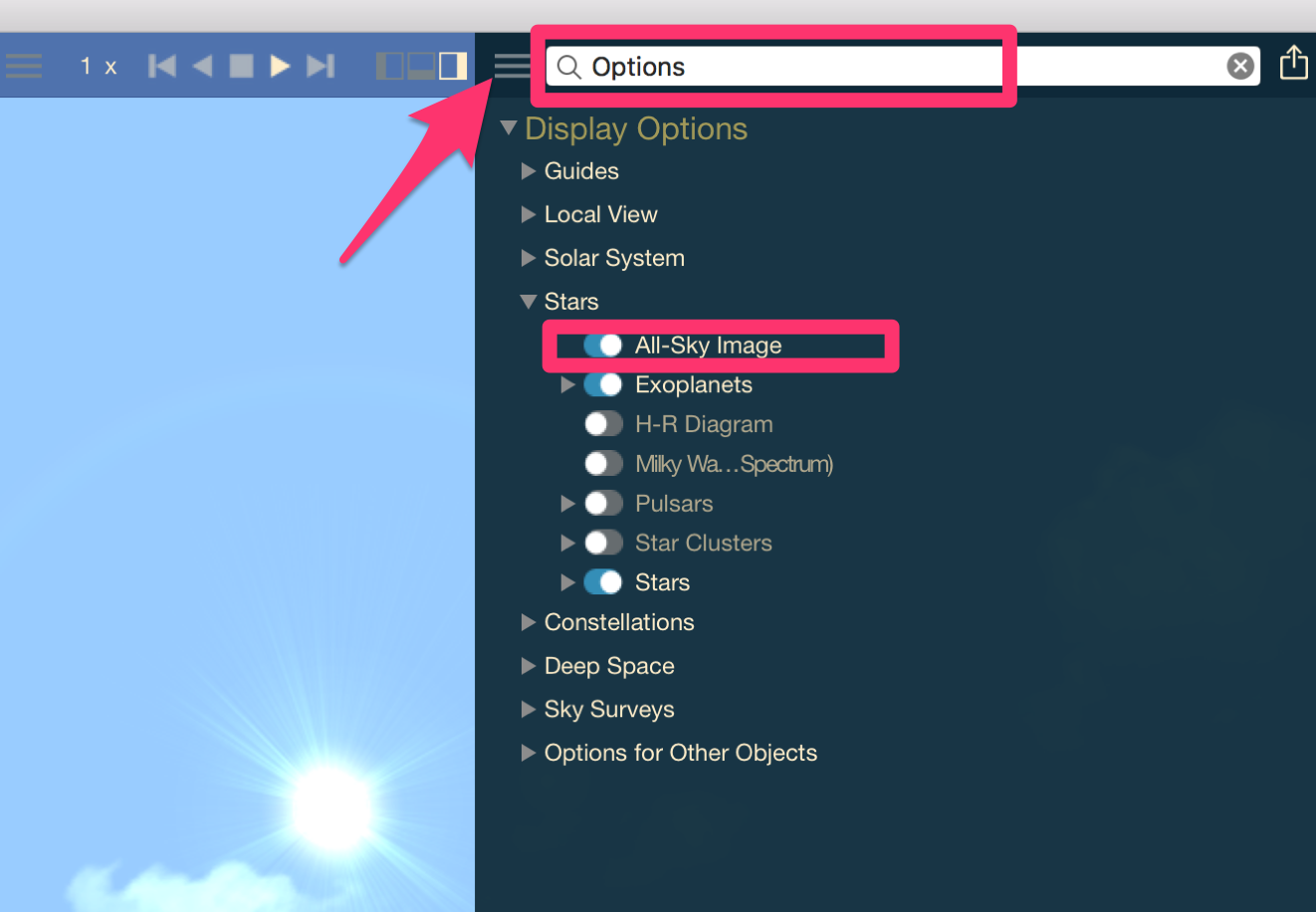
    I could not find the All-sky option.  The way to it was through 'Edit  -> Find' and then type in 'All-sky'

    Is there a more direct route?

    Otherwise, this has provided the solution to the problem.

    Thank you.

  • 0
    Avatar
    Keiron Smith

    An excellent result, Ken!

    And here is how you find All-Sky in the sidebar.  Clear skies!

  • 0
    Avatar
    Ken Brooke

    Thanks, fully satisfied.

    Pity you can't control the English clouds!

  • 0
    Avatar
    Keiron Smith

    Thanks, Ken!  Clear skies (even in England)!

Please sign in to leave a comment.