New post
0

*[Scope] Pro 6.8.7.1 Update Crash On Connect (Solution: Update To 6.8.7.2 Beta)

Hello,

I have been using Sky Safari Pro 6 for years with no issues. After the latest update to Android 13 and Sky Safari, the app closes as soon as I click on connect to my mount and goes to the main tablet screen saying the app has closed unexpectedly. 

I have checked all settings on my RST 300 mount, hand controller and the app. All settings are the same when the app worked. app version is 6.8.7.1 tablet is a Samsung Galaxy Tab S 6 Lite.


Thank you,


Dave

26 comments

  • Avatar
    Keiron Smith Official comment
  • 0
    Avatar
    Keiron Smith

    Thanks for the report, Pono!  Developers will fix it.

  • 0
    Avatar
    Ros Hartigan

    Hi Dave,

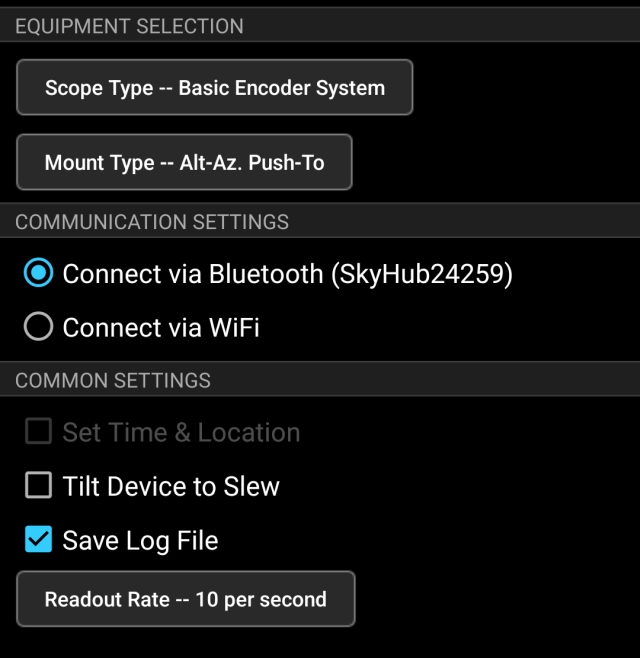
    Can you tell us what connection settings you are using? A screen shot of the telescope setup screen would be very useful.

    Thanks,

    Ros

  • 0
    Avatar
    Pono Dog

    Thank you for the replies. I used a different tablet with android 12 on it. I used the exact same connection settings etc. and it worked as it has been for the last few years. I am sure you guys will get a fix for android 13 issue.


    Thank you,


    Dave

  • 0
    Avatar
    Pono Dog

    My mistake. It is the same issue with Android 12. Click the connect button closes the app.


    Dave

  • 0
    Avatar
    Piero Bradley

    This has started to happen to me too - it was working fine on Aug 20th but wasn't yesterday. I use Sky Safari 6 Pro on Android 12 (Motorola G52 phone) via Bluetooth to a Basic Encoder System (Hubble Optics SkyHub2). Pressing connect leads to a crash. I've attached the settings screenshot and the relevant part of the logfile:

    I hope you can fix this as it's a real show-stopper for me. 
    Thanks very much.
    Piero

    Log for process ID: 6136
    SkySafari Pro, ver 6.8.7.1

    --------- beginning of crash
    09-08 00:46:34.120 18157 18157 E AndroidRuntime: FATAL EXCEPTION: main
    09-08 00:46:34.120 18157 18157 E AndroidRuntime: Process: com.simulationcurriculum.skysafari6pro, PID: 18157
    09-08 00:46:34.120 18157 18157 E AndroidRuntime: java.lang.NullPointerException: Attempt to read from field 'boolean com.simulationcurriculum.skysafari.scope.TelescopeConfig.telCanDoStarSenseAutoGuiderB' on a null object reference in method 'void com.simulationcurriculum.skysafari.ScopeController.updateScopeController()'
    09-08 00:46:34.120 18157 18157 E AndroidRuntime:     at com.simulationcurriculum.skysafari.ScopeController.updateScopeController(ScopeController.java:2109)
    09-08 00:46:34.120 18157 18157 E AndroidRuntime:     at com.simulationcurriculum.skysafari.SkySafariActivity.finishConnectingScope(SkySafariActivity.java:2092)
    09-08 00:46:34.120 18157 18157 E AndroidRuntime:     at com.simulationcurriculum.skysafari.SkySafariActivity.access$1900(SkySafariActivity.java:133)
    09-08 00:46:34.120 18157 18157 E AndroidRuntime:     at com.simulationcurriculum.skysafari.SkySafariActivity$40.run(SkySafariActivity.java:6618)
    09-08 00:46:34.120 18157 18157 E AndroidRuntime:     at android.os.Handler.handleCallback(Handler.java:978)
    09-08 00:46:34.120 18157 18157 E AndroidRuntime:     at android.os.Handler.dispatchMessage(Handler.java:104)
    09-08 00:46:34.120 18157 18157 E AndroidRuntime:     at android.os.Looper.loopOnce(Looper.java:238)
    09-08 00:46:34.120 18157 18157 E AndroidRuntime:     at android.os.Looper.loop(Looper.java:357)
    09-08 00:46:34.120 18157 18157 E AndroidRuntime:     at android.app.ActivityThread.main(ActivityThread.java:8089)
    09-08 00:46:34.120 18157 18157 E AndroidRuntime:     at java.lang.reflect.Method.invoke(Native Method)
    09-08 00:46:34.120 18157 18157 E AndroidRuntime:     at com.android.internal.os.RuntimeInit$MethodAndArgsCaller.run(RuntimeInit.java:548)
    09-08 00:46:34.120 18157 18157 E AndroidRuntime:     at com.android.internal.os.ZygoteInit.main(ZygoteInit.java:1026)

  • 0
    Avatar
    Keiron Smith

    Fix is coming!  Thanks for your patience!

  • 0
    Avatar
    Lionel Guillot

    hi the team developper !

    same problems for me with skywatcher dobson wifi and synscan pro

    I hope the patch will arrived soon !

    thanks you for the job

  • 0
    Avatar
    Luigi

    Hi,

    I have experienced yesterday night  the same problem. No issues till last week, now with the latest update Skysafari crashes when connecting to the telescope (HPS1000 with LX200 emulator, android 9 on Huawei).

    Hope the team fixes the issue asap

    thanks!

    Luigi

  • 0
    Avatar
    Keiron Smith

    SS6 Pro is currently an OPEN beta, available to everyone.

    In Google Play Store (app on your device) > SS6 Pro (listing) > scroll to the bottom and join the beta.

    App must be uninstalled to join.

    Thanks!

  • 0
    Avatar
    Piero Bradley

    Thank you! I won't be able to try it on my telescope for a week or so, unfortunately. However it used to crash on the demo interface and the new version doesn't, which is a great sign!
    Piero

  • 0
    Avatar
    Lionel Guillot

    Hi ! 

    I subscribed to the skysafari 6 pro beta tester program on play store. I was therefore able to download and test the corrective patch ahead of schedule!
    the connection to my telescope is OK again.
    THANKS YOU for this !
  • 0
    Avatar
    Jim Baldo

    I have Pro installed on a number of devices.

    Older version (6.8.6.16) on Motorola Droid with Android Ver. 6.0.1 works. (This is my reference to make sure scope electronics are working)

    Pro version 6.8.7.2 on Nexus13 with Android Ver. 6.0.1 works.  Version 6.8.7.1 gave SS stopped failure

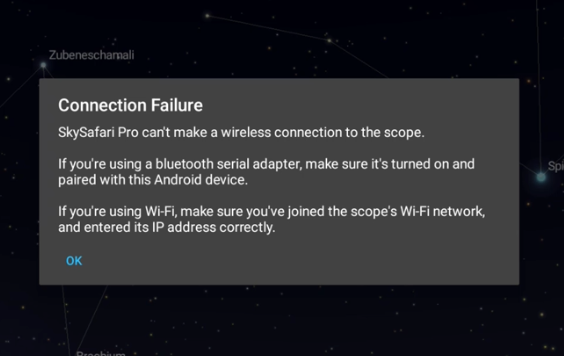
    Pro version 6.8.7.2 on Samsung Galaxy Tab 8 with Android version 13 does not work.  After pressing 'Connect' Pro responds with an immediate 'Connection Failure'.  Version 6.8.7.1 gave SS stopped failure.

    Jim

  • 0
    Avatar
    Keiron Smith

    Jim, 

    Please uninstall Pro 6.8.7.2, reboot your Tab 8, then reinstall the beta.

    Thanks!

  • 0
    Avatar
    Jim Baldo

    Thanks for the response.

    Galaxy: uninstalled, restart, reinstalled - same issue (immediate 'Connection Failure'.)

    Galaxy: uninstalled, power off, reinstalled - same issue.

    Nexus:  still working.

    The Galaxy is fairly new to me.  I've tried to find other settings that may be causing the problem but have been unsuccessful in doing so.  The bluetooth is working with my earbuds.

    Jim

  • 0
    Avatar
    Keiron Smith

    Please make a screen recording of the Galaxy.

    While recording, and in this order...

    1. Go to Settings > About this phone > Software info
    2. Open SkySafari > go to Help > Scroll to the bottom > show the version number.
    3. Show your Telescope Setup/Preset panels.
    4. Show Connect = Crash

    Attach the recording here via a DropBox link or similar file sharing service.

    Thanks!

  • 0
    Avatar
    Jim Baldo
  • 0
    Avatar
    Jim Baldo

    Forgot the version number but it is 6.8.7.2 from the help screen.

    Jim

  • 0
    Avatar
    Luigi

    Hi Keron,

    I could not check the new version (6.8.7.2) on the 10Micron HPS1000 yet (will do this weekend), but I did it it for skywatcher synscan mount and it works.

    Thanks

    Luigi

  • 0
    Avatar
    Keiron Smith

    Jim,

    Its not clear from the video that your Galaxy Tab 8 is connected to the bluetooth device.

    The message suggests you have a connection problem between your tablet and your bluetooth device.

    Please confirm the bluetooth connection.

    Thanks! 

  • 0
    Avatar
    Jim Baldo

    I believe that last response was meant for me (Jim) by looking at the star background of that image.  I'll see if I can figure something out but the concerning point is the instantaneous receipt of that 'Connection Failure' message after pressing the connect button which is clearly evident in the video.  Using my Nexus tablet (referenced in one of my previous posts, everything worked.  I just checked the Nexus again while the bluetooth on the scope was off and I did not get this instantaneous message. Instead, it took about 10 seconds between pressing the connect button and receiving the failure message.

    I've been using a different, manual scope lately since I purchased the Galaxy Tab 8 so a couple of nights ago was the first time I tried the IntelliScope with the Galaxy.  It would be better if I knew a previous version of the software worked with the Galaxy but alas, that is not the case and I can only work with what I have.

    Jim

  • 0
    Avatar
    Keiron Smith

    Jim, 

    Please confirm the bluetooth connection.

    Thanks! 

  • 0
    Avatar
    Jim Baldo

    Tablet shows bluetooth is paired. I've unpaired and paired it many time.  I just loaded a Bluetooth Scanner app on the Galaxy and it sees the scope device with a signal strength of -62dBm while I'm sitting next to the scope.  Hopefully Pono Dog or anyone else will jump in here to report if their tablet with Android 13 is working with the latest fix.  Let me know if there is anything else you'd like me to try.

    JIm

  • 0
    Avatar
    Lis

    Hi.
    I tried SS6 Pro version 6.8.7.2 with BT connection on LX200(OnStep) with device:

    1. Mobile phone with Android 13 : works fine.
    2. Tablet with Android 9 - Samsung Galaxy Tab S3  : also works well.
    3. Tablet with Android 13 - Samsung Galaxy Tab S8 Ultra : also works well.

    The previous version of SS6 Pro didn't work, so everything seems to be fine now.
    Thanks to support for the quick fix.
    Frantisek

  • 0
    Avatar
    Jim Baldo

    Thanks for the response Lis.  Looks like I have some work/learning to do.

    Jim

  • 0
    Avatar
    Jim Baldo

    Fixed......  Now it all makes sense.  I had the 'Nearby devices' permission turned off for SS.  That's why I got that immediate failure and not a delayed one.  Thanks for all the support.

    Jim

Please sign in to leave a comment.