New post
0

SkySafari 6 | iOS Smart Invert

iOS Smart Invert (Settings / General / Accessibility / Display Accommondations/ Invert Colors = Smart) not only keeps the screen darker, but with the iPhone X it extends batter life by 40%+.  

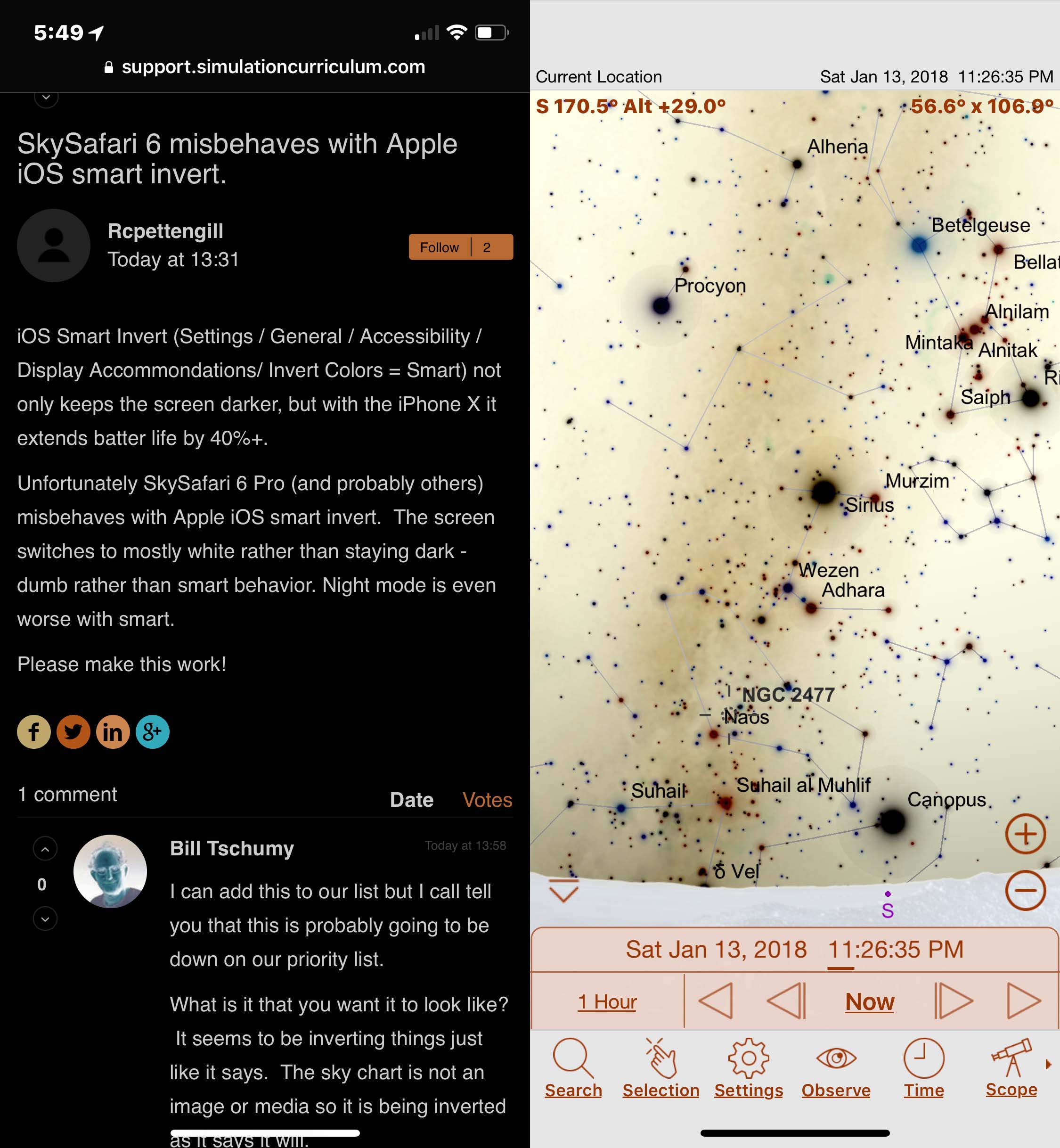
Unfortunately SkySafari 6 Pro (and probably others) misbehaves with Apple iOS smart invert.  The screen switches to mostly white rather than staying dark - dumb rather than smart behavior. Night mode is even worse with smart.

Please make this work!

4 comments

  • 0
    Avatar
    Bill Tschumy

    I can add this to our list but I call tell you that this is probably going to be down on our priority list.

    What is it that you want it to look like?  It seems to be inverting things just like it says.  The sky chart is not an image or media so it is being inverted as it says it will.

    I really have no idea what they mean by "apps that use dark color themes".  We don't use any Apple defined "dark" themes.  I'm not even aware that there are any.  The only reference to a dark theme I've seen is something Apple was supposedly working on for iOS 10.  Unfortunately we have to support back to iOS 8.

  • 0
    Avatar
    Rcpettengill

    Thanks, but there are reasons smart invert is different from invert.  The intent of smart invert is to invert where it is needed (to give a dark themed presentation) and not invert where that interferes with the app function (images are the typical example).  Astro apps with their default dark themes are run afoul of the default behavior.  I believe that it is much more useful to treat astronomical planetarium apps like images: not inverted with smart invert.  As OLED phones become more popular you will have more customers running in smart invert mode by default because of the much longer battery life.  It's hard to imagine users being pleased by the current behavior where your email and browser will be nice and dark, but SkySafari lit up like a bright white flashlight.  Users who always want apps inverted have the option of regular invert.

  • 0
    Avatar
    Rcpettengill

    Here is the current situation for Safari and SkySafari with smart invert on:

  • 0
    Avatar
    Bill Tschumy

    The problem is we don't have any control over what Apple does during smart invert.  I can look some more but I do think there is any way to tell Apple "Don't invert this area of the screen".  This is all under their control.

Please sign in to leave a comment.