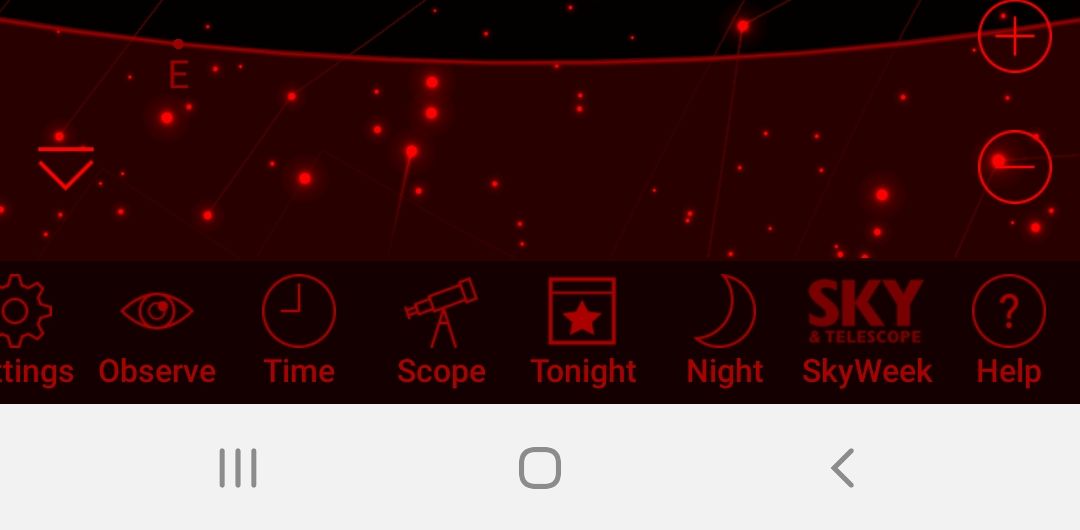
Please could you include the Google Pixel 2's navigation bar in the app's night mode setting? Currently it stays white while everything else turns red. It kind of defeats the point of night mode. I am using Sky Safari 5 Plus.
Thank you for your time
Please could you include the Google Pixel 2's navigation bar in the app's night mode setting? Currently it stays white while everything else turns red. It kind of defeats the point of night mode. I am using Sky Safari 5 Plus.
Thank you for your time

Could you post a picture of what you are referring to? What version of Android are you running?
It seems to be a never ending battle trying to redden all the elements on the screen as manufacturers an Android versions keeps changing things around.

Hi Bill
Here's a screenshot showing the white navigation bar at the bottom. I am running Android 8.1.0
Thanks
I call a function in night vision that is supposed to collapse those button down to some inoffensive grey dots (which is the best I can do as far as I know). That a doesn't seem to be working on your system. It is either the Pixel 2 or Android 8. Not sure which.
Are others having problems with this feature?
Pretty sure it's the Pixel 2 as it's been this way on previous versions on Android. Some of my other star apps simply hide the nav bar and go full screen (is it called immersive mode?). Is that a possibility for Sky Safari?
Thanks
I can look into this for SkySafari 6. Thanks for the tip.
Thanks Bill
Hi Bill,
I've just downloaded SkySafari 6 after a lot of eager anticipation, but have found that the issue remains.
So night mode is still useless as there are still these bright, white toolbar buttons below.
Any ideas?
Thanks
What version of Android are you on?
I have spent considerable time on this and the upshot is some versions of Android (or some manufacturer's modifications) don't respect the programming calls to hide the buttons when in night vision. There is really not a lot else I can do. If this is a serious problem for you I would recommend putting some red film over the screen.
I appreciate you trying !
I'm on Android 9 Pie
So there's really nothing to be done? No future updates can ever fix the issue?
Maybe Android will fix this in an update. I am doing exactly the right calls and they are ignoring them. I have experimented with hiding navigation button totally (rather than minimizing them) but this causes other problems.
I won't say I will never find a workaround, but I have spent many hours on this with no success.

I'm getting the same issue with my Galaxy s9 android version 8. Sky safari pro 6. Night mode in other apps work, not sky safari.
Dan,
Could you describe (or attach an image) of what the other astro apps look like in night vision mode? That might help me find a solution.
Bill
https://photos.app.goo.gl/4dTdSuKE2HrAMscK6
I hope this works. I just got an android. One photo is Netflix and the other is pocket cast, my podcast player. I tried to use sky safari tonight at the telescope. Very frustrating. I tried a sticky note--didn't stick very well lol Thanks for your efforts! I loved your app in iOS
Sorry I didn't mean to suggest they were astro apps--just other apps that can darken that strip. I should have said dark mode.
Are you talking about the background of the navigation strip? I am referring to the colors of the icons. I see those as white in your pictures. Are you saying the background on your phone is white?
https://photos.app.goo.gl/yTSQpuScX8sjbvxo8. Yes the background of the navigation strip is white. The icons are fine. That white is like a 100w lightbulb in your eyes at the telescope
https://photos.app.goo.gl/tVf3Pq7kneTyuFQn7
Here's night mode in my browser. Nav bar is black and the icons are white they would be better red, but the main thing is I need the black nav bar.
Thanks again for your help
Dan,
Thanks for the images. I have no idea why you are getting a white background. On my Android 8 device I get a black background. I will see if I can figure out what is going on.
Is anyone else following this thread getting a white navigation bar background? I am not able to reproduce this on any of my devices or in the emulators. Unfortunately I don't have a Galaxy s9 emulator.
Since you said you didn't see it in yours, I drilled down into the phone settings and found how I could hide the nav bar. Like I said above I just went to this android from an iPhone and there's about 1000 settings. This is a decent solution for me. Thanks for your time and effort.
Hi Dan,
Could you please tell me how to change these settings?
Thanks

Bill,
Was just searching for this topic on my Galaxy Note 9. The nav bar is white and does not obey the night color request. I'm running android v 9 and SkySafari Pro 6. I can also minimize the bar as others have said as a workaround though. I do have an android app that though that makes the nav bar slide down on startup and with a swipe up it reappears and then will timeout and rehide itself. Maybe they have fixed the os now?