Installed 7.6.5 update, shortcut icon no longer works. Cannot locate exe file. Running Windows 10.
Date
Votes
17 comments
-

Donald Swetzig Hi I am running 7.5.3.1378 SN7 Celestron version. Upon startup is stated an update is available and I proceeded with the update and after completion of the install Windows 7 stated the program was no longer there. I checked the install folder and the EXE was missing so I reinstalled my original version and I tried the update install again with the same results.
Note I have windows defender as my virus Software in case this will be one of your first question.
So I would say I have duplicated Mike A's same issue for the opening thread.
Hope its an easy fix.
Don
-

Keiron Smith Thanks for the reports! We'll figure this out on Monday.
DevOps reference: https://starrynight.unfuddle.com/a#/projects/7957/tickets/by_number/9234
-

Andre D Ficklin Hello,
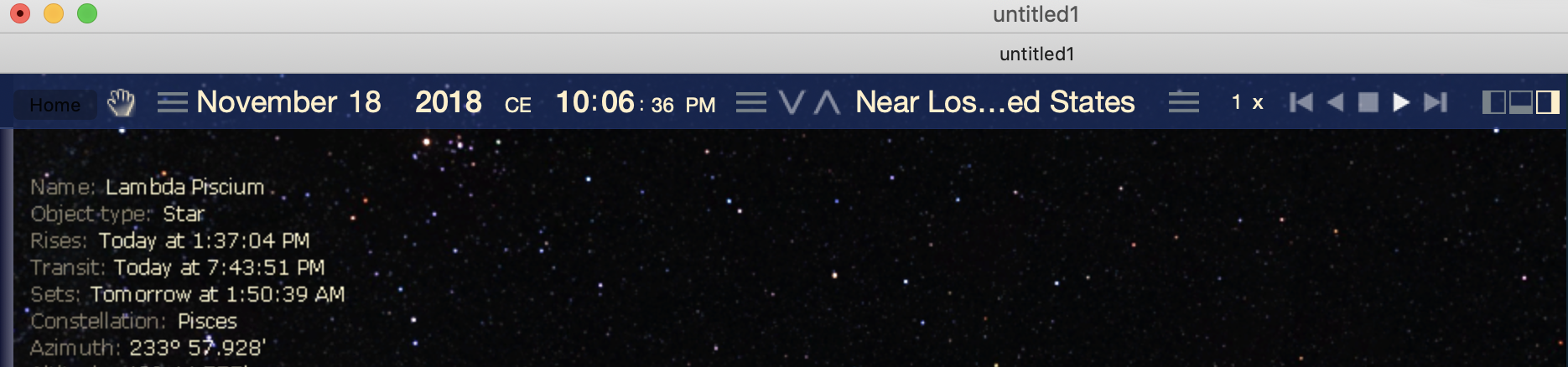
I am using starry night 7.6.5 with Mac OSX Mojave. In Dark Mode the Home Button is still unseen. See snap shot below.
Thanks for the new version.
-

Mark Phillips Keiron, thanks for the reply on the other (incorrect) thread, hope you find a solution.
Mark
Previously posted
Kieron
Sorry to jump on this thread but having just been notified of the 7.6.5 update I installed it - and now SN7 doesn't exist on my machine! The executable starrynight.exe (and almost everything else in the C:\Program Files (x86)\Starry Night Celestron 7) folder has been deleted but not replaced by the updater.
System is Starry Night Celestron 7.6.3 1377 keEW on Windows 10 Home
Mark
-

SIMON WELLS Can confirm this problem on my Windows 7 PC tonight. I've updated to the new version and the update does indeed delete all the main exe files and DLL files in the installation directory. Uninstalling everything and then reinstalling the original V7 does solve the problem, so I then copied all the files to another location, did the update again, then copied the files back. It still failed to run.
So for now folks, I'd recommend not updating.
-
Keiron Smith Hi Everyone,
We are onto the issue and will have a fix asap.
Thanks for your patience.
-

hwilson34 I had the same problem with win/10. I reloaded twice and same results. I deleted everything and reloaded the original and it is working okay. The update is worthless at this time.
-

Star Gazer (StarGazer) I also ran the update and lost my shortcut to the program (.exe) file
-
SIMON WELLS Has this issue been resolved yet?
-
Mark Phillips This thread has now been idle for a month, Is there a resolution to the issue yet?
-

Mike A Since Version 8 is out, I'm assuming there will be no fix.
-
Keiron Smith Hi All,
Please delete the current SN7 program and reinstall from your download links. Everything will be working fine again.
Thanks for your patience.
Happy holidays!
-

Bushnelli Greetings. The latest update to Pro 7 did fail on my win 7 system and my original SN is SN Pro 6 on DVD. If I uninstall Pro 7 and reinstall Pro 6 will I be able to update to the Pro 7 I was using before this failure? Thanks gb..
-
Bushnelli Farther to my previous statement today at 07:34, I attempted the update February 1, 2019
-
Bushnelli Further to the two previous posts. After the attempted update to SN 7 Pro. I received a message that the program could not start because MSVCP 140.dll is missing. Try reinstalling the program to fix this problem. Does this .dll come in the SN program?
-
Keiron Smith The missing MSVCR140.dll can be downloaded here: https://www.microsoft.com/en-US/download/details.aspx?id=48145
-
Bushnelli Thank You...All is well
Please sign in to leave a comment.