New post
0

Choosing Observing Lists for Observations

Hey Keiron--

For the following recent update, would it be possible to display the lists at the top that an object is already a part of versus just putting the entire list?  Almost 100% of my observations are of objects that are already in a list and now I find myself having to do a lot of steps to find out what list an object is already part of just so I can document it correctly.  In my opinion, this update is a big step backward since there was already an easy way to add an object to a list just prior to creating the observation.  It seems like it would be easy to show lists that the object is already a part of in an upper section with a divider and then just below that, all of the rest of the lists that someone can add it straight from the observation.

• When associating an observing list with an observation, we now show all observing lists rather than just those that contain the object.  If the chosen list doesn't have that object in it, we give you the option to add it.

Thanks
Chris

12 comments

  • 0
    Avatar
    Chris

    Hey Keiron-- Just wanted to follow up on this.  I've noticed that there are many posts in the Android forum that are awaiting response other than mine as well.  Thanks!


    Chris

  • 0
    Avatar
    Bill Tschumy

    Keiron has been somewhat swamped with the Starry Night 8 release.

    You can find what lists an object is in from the "more" button inhale object info.  I added this just for you.


  • 0
    Avatar
    Chris

    Thanks for your response Bill. As I indicated before this most recent change, before you added that option for me, this is very far from ideal and is a step back in my opinion. Let me explain.

    Let's say I'm looking at NGC 936, which is on my highlighted Herschel list. In the same field of view is NGC 955, on the Pensack 500.

    Previous to this update:

    1. Click on NGC 936
    2. Click Selection > Create New Observation (List shows up since highlighted)
    3. Click on NGC 955
    4. Click Selection > Create New Observation
    5. Click Observing List
    6. Select from lists the object is already on

    After the update:

    1. Click on NGC 936
    2. Click Selection > Create New Observation (List shows up since highlighted)
    3. Click on NGC 955
    4. Click Info
    5. Click More
    6. Click Show Lists Containing Object
    7. Memorize list name and click back
    8. Click Back again
    9. Click Selection > Create New Observation
    10. Click Observing List
    11. Scroll through all lists until I find the one I memorized
    12. Click the observing list name


    For the life of me, I can't understand how this is an upgrade.  This isn't something I do rarely either; I would expect LOTS of people who are using SkySafari for observation logging would typically log nearby objects that aren't in the currently highlighted list.  It was wonderful the way it was, but the obvious solution, if you want to have all lists show up when clicking Observing List, is to show the ones first that it's already on, and then show the rest.  Wouldn't it be useful, even for someone who wants to add it to another from this location, to see where it's already added first?  I don't understand why someone would want to add objects to a list as they're observing them, which is why this change was even made, but I guess there could be a reason?  Seems far less likely of a scenario to me, but there is a solution that should appease everyone, and it's not what we have.  I unfortunately cannot upgrade my SS6 Pro on my tablet until/if something changes.

    Chris

  • 0
    Avatar
    Bill Tschumy

    Chris,

    I think the new process process is more streamlined than that.

    1. Select NGC 936
    2. Show Info for the object
    3. Tap the More button and choose "Show Lists Containing Object"
    4. Tap the list you want.
    5. Tap the object in the list and choose "Create Observation"

    That's it.  Does that work for you?

  • 0
    Avatar
    Chris

    Hey Bill--

    This actually doesn't work for me, as the object is one in a list of 500 objects; scrolling through and looking for it would take longer than the process I gave above.  That would also be forcing me to use two completely different methods to create an observation depending on whether it's on my currently highlighted list versus a nearby object.  I guess I don't understand the hesitation to show users lists that the object is a part of already versus not a part of.  Either way, if this can't be done, I'm happy to just keep using the version I have for observation logging, as it works great for my use.

    Chris

  • 0
    Avatar
    Bill Tschumy

    Continuing to use the old version is not a solution.  There will be bug fixes you will want to incorporate.

    The whole reason for showing all lists is so the user can create an observation in a list without having to previously put the object in the list.  It is automatically added if missing.  This was a highly requested feature.

    I will think about this some more.  Some possibilities:

    1. When you open an observing list, scroll to the currently selected object.  This will make it easier to find.  On iOS I mark the currently selected object in the list.  This also makes it easier to find.  Looks like I don't do tis on Android.  Not sure if this is a bug or I just forgot to do it there.

    2. I could have a toggle to show all observing lists o only those containing the object.


  • 0
    Avatar
    Bill Tschumy

    Would it help to mark the lists that contain that object?  I can see if you have hundreds of lists that might not be as useful, but if there were 20 or 30 then that would be an easy way to see what lists contains the object.

  • 0
    Avatar
    Chris

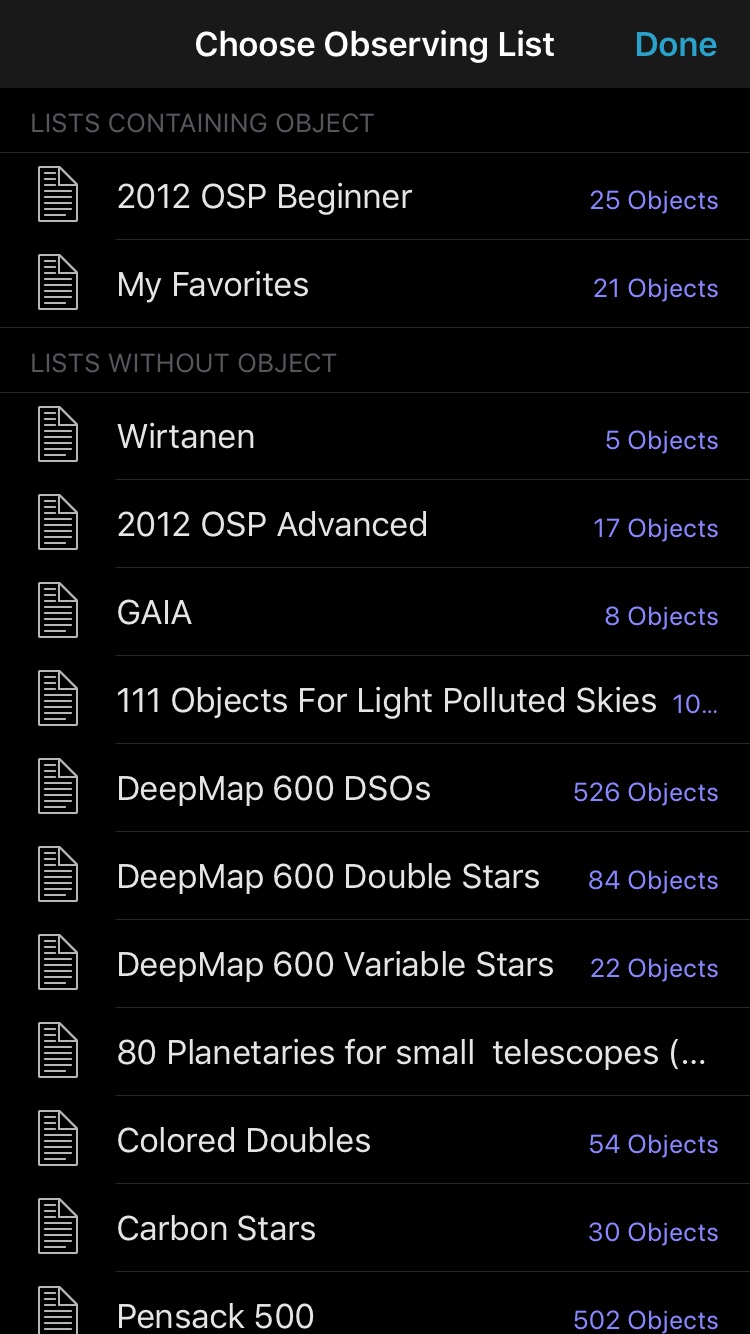
    That would help for sure.  Optimally, that menu would look something like this:


    Choose Observing List

    Lists Containing the Object
    List 1
    List 2
    List 3

    All Lists (Or Lists Not Containing the Object)
    List 4
    List 5
    List 6

    Essentially, taking the code you already wrote for the Show Lists Containing Object and listing that first, then either all lists below that, or the difference.

  • 0
    Avatar
    Chris

    Hey Bill--

    Any chance that the upcoming release will have anything to address this?  Thanks

  • 0
    Avatar
    Bill Tschumy

    I'm sorry, I have not made any progress on this.  I will try to revisit it before release.

  • 0
    Avatar
    Bill Tschumy

    Chris,

    OK, I think I've made it work just like you wanted:

  • 0
    Avatar
    Chris

    That's perfect Bill, thank you so much!

Please sign in to leave a comment.