New post
0

SkySafari 6 Pro Does Not Use Full Screen And Night Vision Mode Does Not Cover Gesture/Buttons On Samsung Galaxy S10 (Solution: Use The New SkySafari Keyboard!)

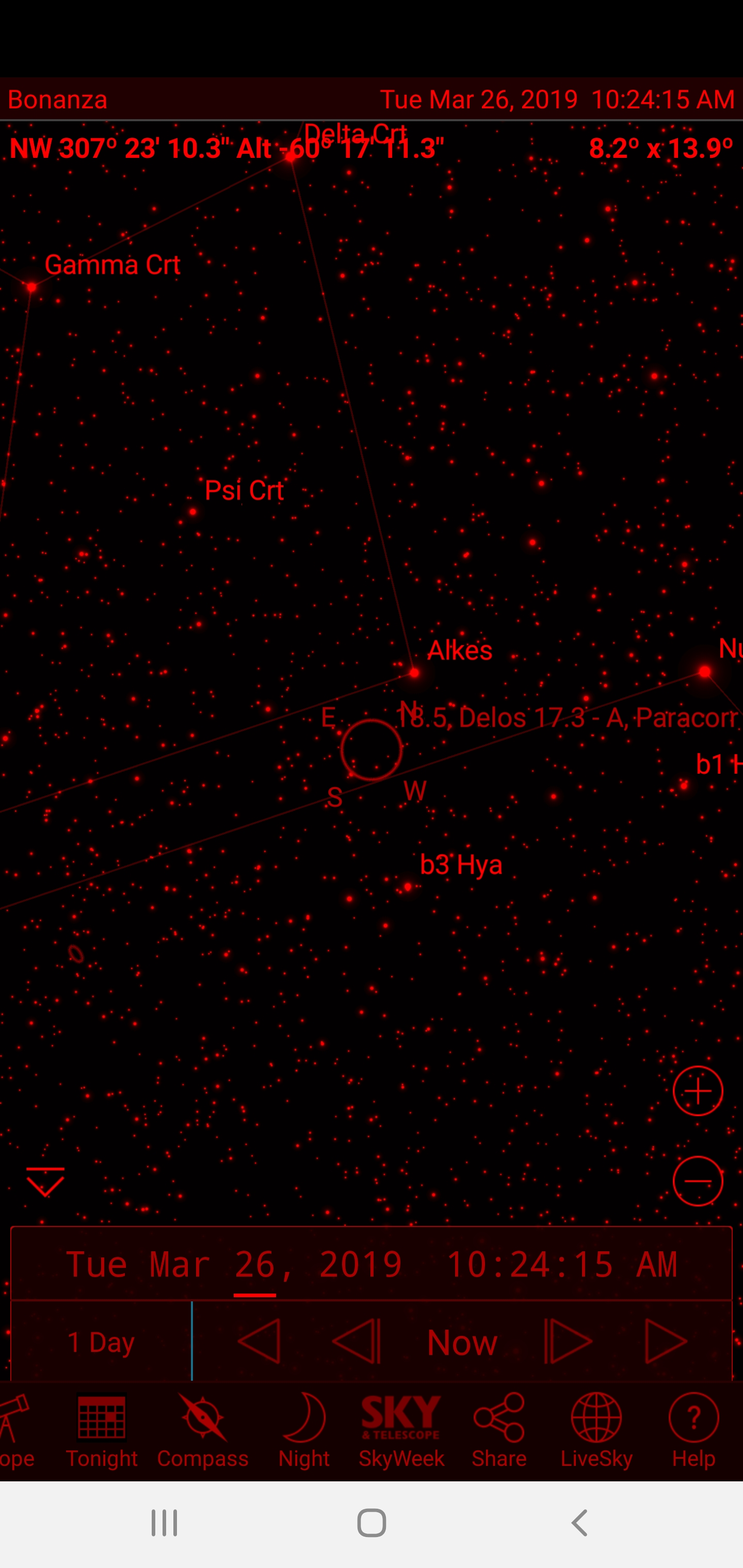
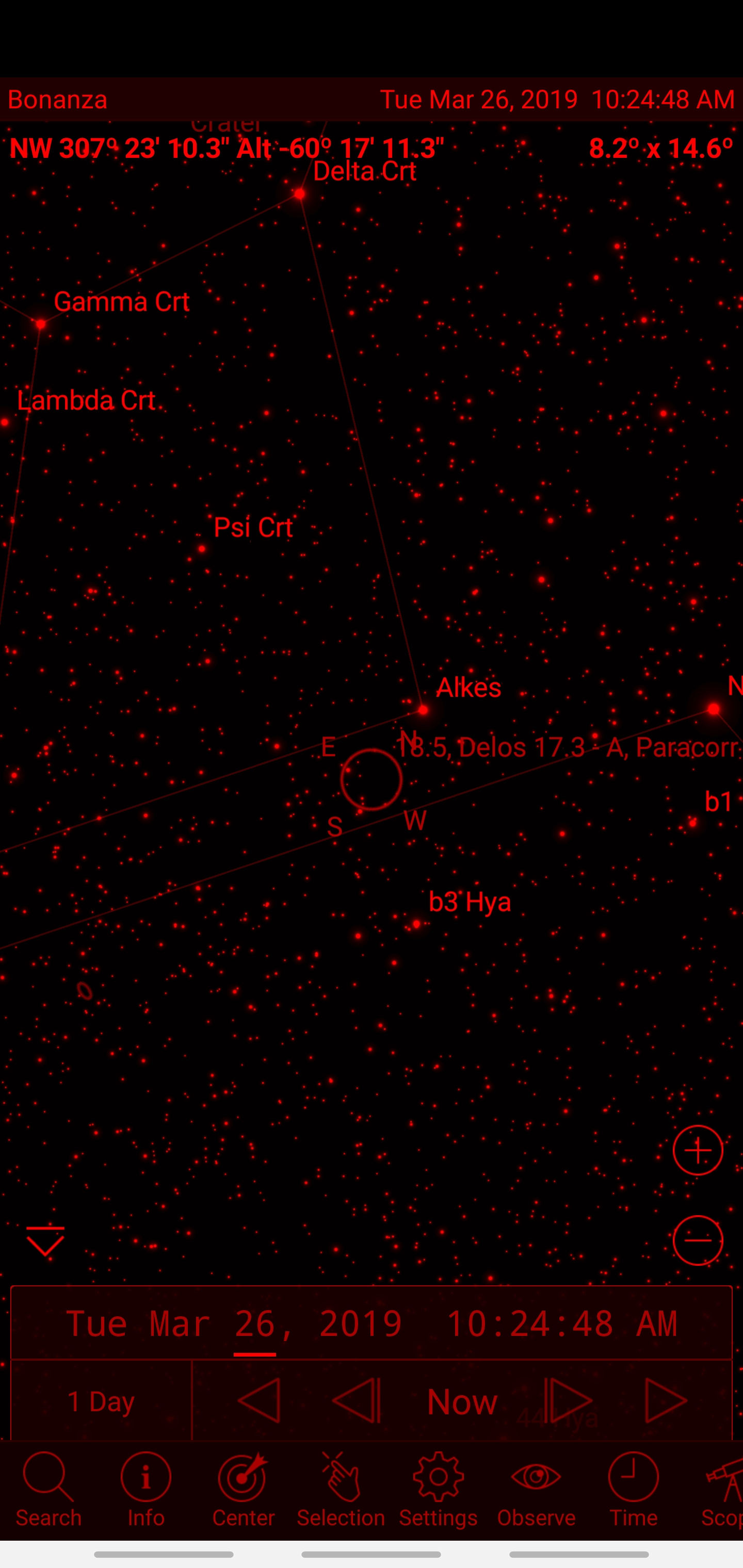
On my new galaxy s10 with the most up to date sky safari and Android 9, I'm seeing two things. One, the full screen is not being used, with the very top of the phone screen not being covered by the app. Secondly, whether I have buttons or gestures at the bottom of the screen, the night mode doesn't cover them. I can't remember if this is just something you guys can't help. Here are screen shots.


20 comments

  • Avatar
    Keiron Smith Official comment
  • 0
    Avatar
    Bill Tschumy

    1. I have no idea about why the display wouldn't go to the top.  I will get our part-time Android expert to investigate.

    2. We have no control  over the color of the bottom buttons.  I have looked at this a number of times.  It is particularly annoying that they are using a white background for that area.  On most Android devices that area is black.  I recall that on some devices that area was white but a recent update made it black.  If you search the Android forum you might find this.

  • 0
    Avatar
    Bill Tschumy

    I was doing a little research on this.  The way we get the screen size apparently doesn't work in "multi-window mode."  I don't even really know what this is but it is possible you have this enabled?

  • 0
    Avatar
    Chris

    I think multi-window mode probably comes enabled by default, where you can essentially do two things at once via two windows on the screen.  I think you can even do three.  I occasionally use it but never when I'm using SS.  It looks like the Nav bars were changed to white with the S8, as I remember being annoyed with this change when it happened.  You can see here that they apparently were afraid of burn-in issues with the nav buttons:

    https://www.androidauthority.com/samsung-galaxy-s8-black-nav-bar-update-779995/


  • 0
    Avatar
    Bill Tschumy

    Chris,

    As a test, is it possible to disable multi-window mode to see if that fixes the blank space at the top?

    Bill

  • 0
    Avatar
    Chris

    I think the S10 calls it 'split screen view' and it's only accessible when you have an app open and hit the left most button on the navigation bar that brings up the app switcher.  You can then switch TO split screen view, but there are no settings anywhere in the settings menu for split screen, such as a place to disable anything.  It's hard to imagine that being why we can't get to full screen, unless of course I was actually opening SS in split screen view.  

  • 0
    Avatar
    Martin Costa

    Hi,

    This may be related to the camera cutout. Does the UI start just below the camera cutout? Or is there more black space on the screen? A photo of the entire device with SkySafari open would be very helpful.

    Thanks,

    Martin

  • 0
    Avatar
    Chris

    Sorry I didn't see your response until just now. The UI does start just below the camera cutout. I know that's an option to force all apps to do this, but this is the only app I have that is doing so currently.

  • 0
    Avatar
    Bill Tschumy

    Chris,

    As Martin has suggested, could you attach a screen capture showing what you are seeing?

    Bill

  • 0
    Avatar
    Chris

    I attached screen shots in my original post above. I tried to snap a picture of my phone with another device but it didn't show anything diff.

  • 0
    Avatar
    Bitter Frampton

    Hi Chris, i got the same issue, you should put your phone on "night mode", the bottom buttons will be grey (not black tho, but it helps) you ll need to go to settings->display->night theme

  • 0
    Avatar
    Keiron Smith

    Thanks, Bitter!  Night Theme does help fix the grey button issue, making them black.  I tried to find a way to expand the app so it uses the screen where the camera is, but I couldn't find anything.

  • 0
    Avatar
    Chris

    Not to knock you guys, you know I love your work, but this is the only app I have out of hundreds that doesn't use the full screen. Seems like a coding issue somewhere.

  • 0
    Avatar
    Bill Tschumy

    Chris,

    I have been working with Keiron on this (who also has an S10).  As far as I can tell other apps use this to display the Android status bar (time, notifications, Wi-Fi status, etc).  SkySafari hides the Android status to get more screen space.  However, it looks like on the S10, it doesn't really recover that screen space, just replaces it with a black area.

    Even if I could figure out how to expand into that space, I don't think our status bar will fit there.  The camera on the right takes up a chunk of the width and I don't think the time and location will fit there in that case.

  • 0
    Avatar
    Keiron Smith

    Chris, 

    Just to add a little here.  When SkySafari is open, if you drag down from the top of the screen you will see that space is used, showing the Android status bar.

  • 0
    Avatar
    Girard Bowe

    Figured out a way to get SkySafari mostly fullscreen in Android 9. Go to Settings, Navigation Bar, and select Full Screen Gestures and undo Gesture Hints. This hides the bottom bar and requires you to remember where the icons on the Navigation Bar are. You can re-order the icons if you wish. Enabling Gesture Hints gives you a smaller white field with gray bars where the icons would be. The Current Location Time & Date Bar are still shown at top, but is still less intrusive than the Navigation Bar - white letters on a black blackground. Now if I can figure out how to get SkyWeek to work!

  • 0
    Avatar
    Don Gazdik

    Bumping this issue for consideration for correcting in the next release of the software.  While Samsung phones have the option to remove the nav buttons/gesture hints, my Google branded Pixel phone does not.

    I'll add a somewhat related issue where when in night mode/red mode if I select an item, the item background flashes an greyish color.  It'd be great if that flashing could be disabled as well.


    Thanks!

  • 0
    Avatar
    Don Gazdik

    Hi

    Just wanted to say Thank You for the fix to the full screen issue.  With the latest version I see the navigation buttons are hidden when in night vision/red screen mode.

    Thanks!

  • 0
    Avatar
    Don Gazdik

    Hi

    Not sure if I should post here or start a new thread/bug but I've encountered an issue in night vision mode.

    When I select some of the icons (Selection, Observe...) or use the view menu to change the orientation while in red screen mode, the navigation buttons re-appear at the bottom of the screen.  The top android bar with the time and notification icons doesn't appear with the navigation buttons.  This is on a Pixel 4a running Android 11

  • 0
    Avatar
    Keiron Smith

    Don, 

    Please create a NEW post and include:

    1. App and version 
    2. Android version
    3. Device model
    4. Clear description of path to reproduce the issue
    5. Screenshots

    Thanks!


Please sign in to leave a comment.