New post
1

Search For Double Stars By Separation Displays Inconsistent Results (Looks Like A Known Decimal Separator Issue On Non English Keyboards)

Hi,

this is related to Android App Sky Safari 6 plus 6.1.0.34

Observe Planner :
If I search for Double stars, Magnitude 7 -8, Speparation 0.8 - 1.2 it finds 35 objects.
For example : Zeta Antilae, 7.0 and 6.16 Visual Mag and separation of 8.1" at 32°.
That's not what it should find.


Carsten

10 comments

  • 0
    Avatar
    Bill Tschumy

    Carsten,

    If I use the Planner in SS6 Plus with those search parameters, I get 43 objects. Can you verify that you told us the correct parameters?

    Bill


  • 0
    Avatar
    Carsten Moos

    Bill,

    yes the parameters are correct and I still can reproduce to get 35 objects. Maybe It ist depending on date/time or location. But that is not the point. Many of the found stars do not have the given separation.

    Carsten

  • 0
    Avatar
    Bill Tschumy

    Shouldn't be dependent on date/time unless you have explicitly set a time range to search in.

    There is no Zeta Antliae in the database.  There is Zeta1 and Zeta 2 Antliae.  Which are you referring to?  Can you give me another example of a star that doesn't match?  

    In some cases we display the separation in the Info as computed for the current date using parameters in the 6th Orbit Catalog.  However the search will use the (older) separation as stored in the database.  This is because computing the current separation is too slow for a fast search.  However, that probably doesn't explain your result of a 8.1" separation.

    I asked for another case because in my search with those parameters, I don't get Zeta1 or Zeta2 returned.

  • 0
    Avatar
    Carsten Moos

    Hi Bill.

    Zeta1 is the first: Separation 8.1" at 32.0°

    Epsilon Equulei: Sep 0.1" at 278°

    Omega Fornacis; Sep 11.0" at 246°

    my hydra: sep 8.1" at 302.0°

    ....

    last is

    SAO 241674: Sep 9.1" at 337.0

    It can be a problem of the decimal point.If I use a range of 1 to 2 it seems okay. But at the keyboard is no other key for a point.


  • 0
    Avatar
    Bill Tschumy

    Are you using a non-US keyboard by any chance?  When you type the decimal point, does it look like a decimal point?  You may be right that it is related to that.  As I said, I get a different set of search result and they all look correct.

  • 0
    Avatar
    Carsten Moos

    Hi Bill,

    don't know how or if. If I type a decimal point in your app it looks like a point even on the screen and also on the virtual touch pad. In my Country the decimal point is normally a comma.

    Carsten

  • 0
    Avatar
    Bill Tschumy

    I need to know what country you are in so I can investigate this.  I thought we had all the decimal separator problems fixed, but looks like there is still some issue.


  • 0
    Avatar
    Carsten Moos

    Hi Bill,

    I come from Germany

    Language Deutsch

    Keyboard: Samsung keyboard

    Carsten


  • 1
    Avatar
    Bill Tschumy

    On my device, when I set the language to Deutsch, I get a keyboard with both the comma and period.  When I type the numbers using the comma everything works fine.  If I type using the incorrect period as in 0.8 and 1.2 I get "8" and "12".  

    I really don't know why you are not getting a keyboard with a "," character.  As far as I can tell I am specifying the input type correctly.  We have a new Android person doing some work for us.  He is on vacation this week, but I will ask him when he gets back.

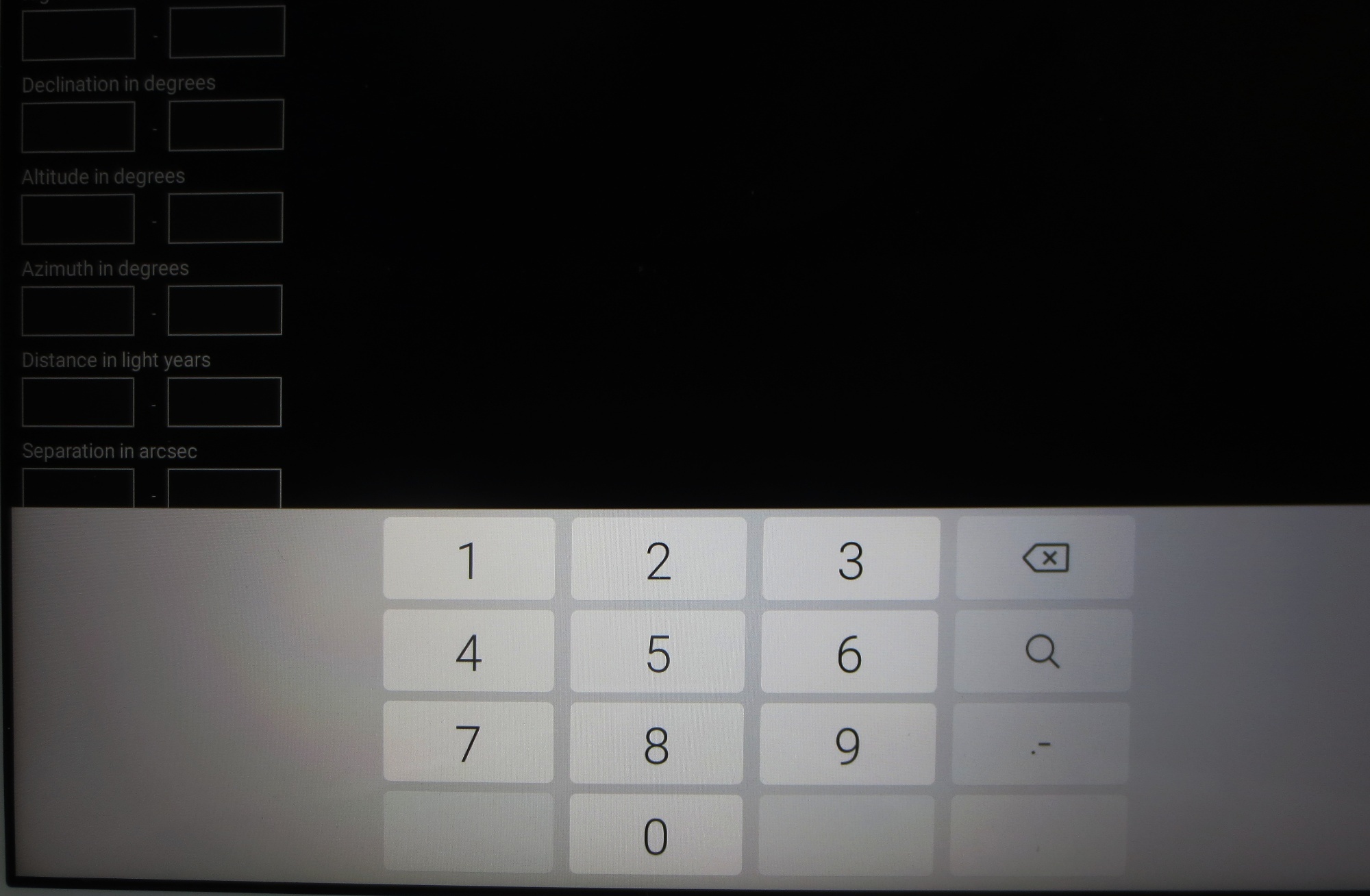
    Could you take a screen shot of the keyboard you are using so we can see what it looks like?  Attach it to a response here.

  • 0
    Avatar
    Carsten Moos

    Hi Bill,

    your Android person can enjoy his vacation, there is no hurry. The weather is not fine.

    I have done two screenshots. ( I'm ashamed, because I didn't get it as hardcopy, none of the suggested ways worked, so I used a camera).

    Please notice, that in the second image both commas are used: period and comma.

    Carsten

Please sign in to leave a comment.