Recently whenever I pushed the compass button it would just show a jumbled mess of stars in the center of the screen. It's now to the point where I can't even move around as this screen keeps popping up all the time rendering the program useless.
Date
Votes
13 comments
-

Kevin Galka I'd send a screen shot not sure if I can
-

Keiron Smith 
-

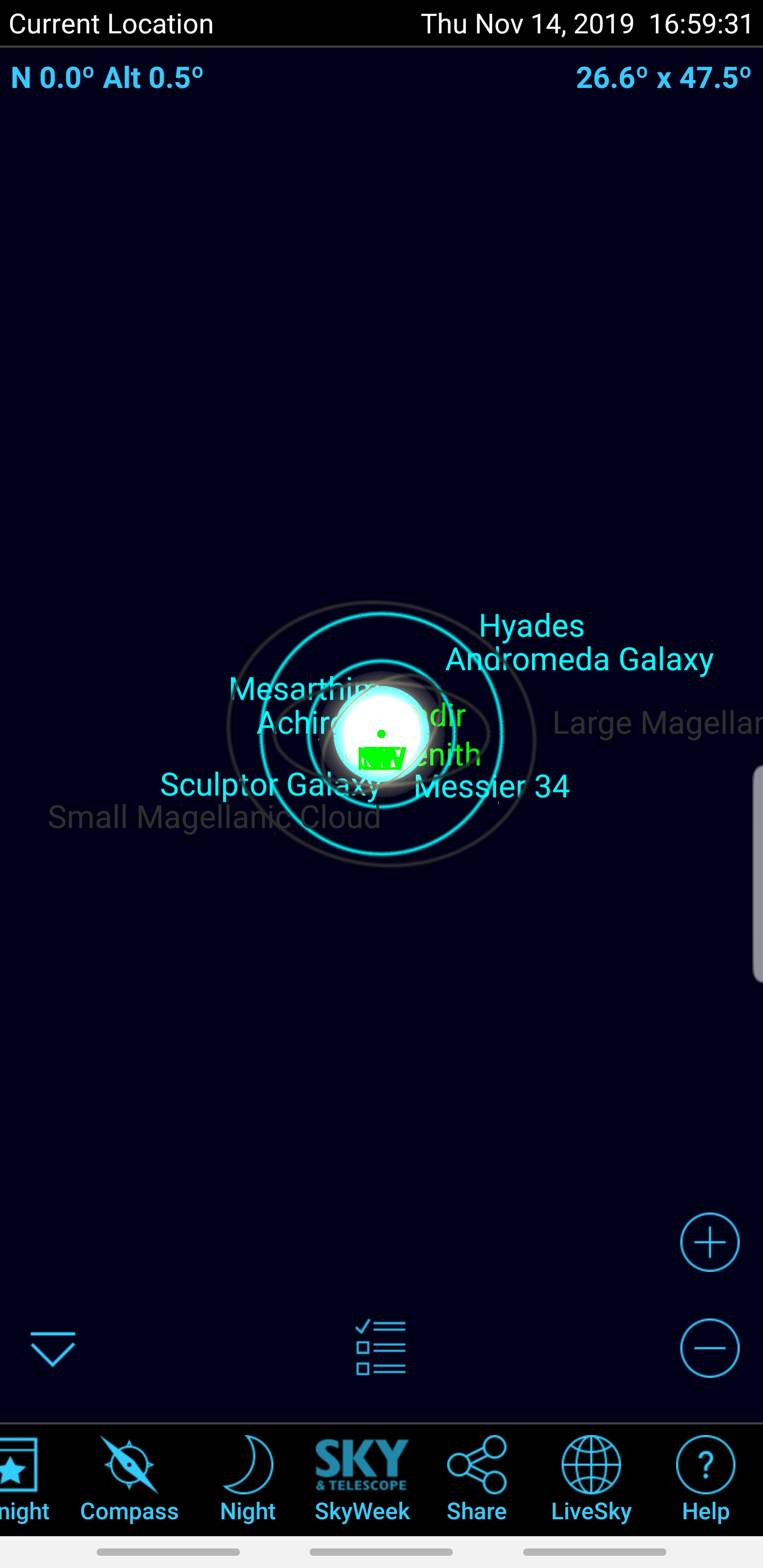
Mark Phillips I have this issue too. I attach a screen shot.
This happens immediately I press the compass button or if the compass auto-activates on tilting the phone.
Tapping the screen turns off the compass but doesn't change the display, Tapping again restores to the display to normal.
The compass is unusable.
This is on a Samsung Galaxy S8 running Android 9
Hope you can identify a fix for this. I have tried clearing cache & data - no difference
Uninstall / reinstall - No difference.
Thanks
Mark
-
Keiron Smith Try this.
Important! Do NOT delete the following folder. Just RENAME it.
- Uninstall the app
- Using a file browser, go to the top level of the SD card and RENAME the directory "SkySafari 6 XXX", where XXX will be "Plus" or "Pro" depending on which version you have.
- Now reinstall the app and try again.
Please let me know if the above resolves the issue.
-
Mark Phillips Kieron
That seems to have fixed it, at least for now. What was going on?
Do I need to keep the now renamed directory? I see no new one has been created and my custom backgrounds are still available from that directory so I imagine the answer is yes.
Thanks
Mark
-
Kevin Galka I was able to correct the issue by powering the phone off and then on again... however it only seemed to work for a few weeks after this and is now starting to act up again... as if there's a memory leak or something.
I'll try that uninstall process but it seems overly complicated... why does an uninstall not actually remove all the files?
Thanks
Kevin
-

alkassim I've been suffering from the same problem for a couple of months. The problem was resolved last month when my Note8 was updated to the lastest software. I got the problem again last week and cannot fix it.
-
Keiron Smith Hi Mark,
I don't know why that fixes it. And, if the folder is renamed it is not in use by SkySafari anymore. If you quit and restart the program that should rebuild the original folder. I will guess that Android OS updates are corrupting the folder, or corrupting files in the folder, I can't say for sure. So, it's not a problem with the app, imo. I believe it is problem with the Android OS updating process.
-
alkassim The problem got fixed by itself today without renaming any folders or uninstalling Sky Safari. No idea what fixed it.
-
Keiron Smith Excellent - we'll take the wins any way we can :)
-
Mark Phillips Thanks again Kieron
I deleted the old directory from the SD card and it's all still OK. I hadn't realised there was a copy of my custom backgrounds also on the internal storage, so nothing lost at all.
Weird interaction between the App and the OS but, as you say, let's just take the win. :)
Mark
-
alkassim I got the problem again tody. I think I have figured out what the problem is in my particular case, which could also apply to others.
I have noticed that this problem occurs after I disconnect SkySafari from the AZ GTi mount.
I will get back to you guys shortly. Let me just try something. -

Dmitry ZHUkow Hello! I got the same thing. Android, Xiaomi Mi Mix 3.
I was delete and reinstall the app - no matter, was delete app, delete folder "SkySafari 6 Plus", reinstall app - no matter. The same - when use compas all universe goto in one point. I noticed that the direction in the upper left corner is reset to 0 (like on image above). But, after reboot, it worked as expected.
Please sign in to leave a comment.