New post
0

Why Do I Get An Error Connecting Starry Night Pro 8 On Mac 10.13 + Prolific driver + Orion StarSeeker II + Serial to USB? (Answer: Can Not Use Intelliscope RS232 Cable With Non-Intelliscope Mounts)

Hello, 

I'm new to StarSeeker and computer controlled telescopes and am having issues getting StarSeeker to control my telescope. I'm guessing the issue is with the driver that is installed but I'm not sure the cause. I have the following setup:

- Orion StarSeeker II Telescope - Altazimuth GoTo Refractor

- Orion 5222 Intelliscope to PC RS-232 Connector Cable

- Orion 52419 USB-to-Serial Adapter

- MacBook Pro 10.13.6

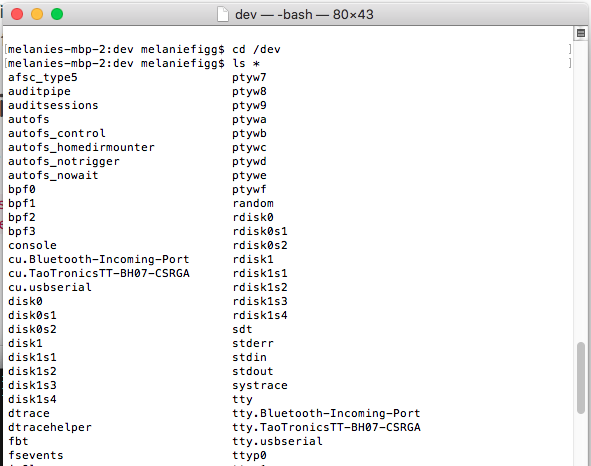
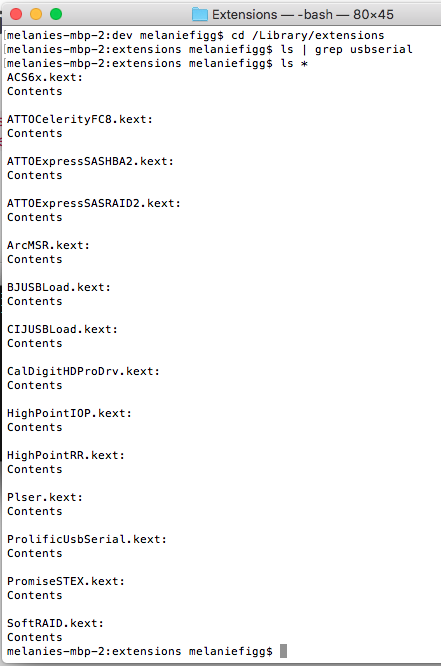
- Installed Driver - http://www.prolific.com.tw/US/ShowProduct.aspx?p_id=229&pcid=41 PL2303HXD_G_Driver_v2.0.0_20191112.pkg


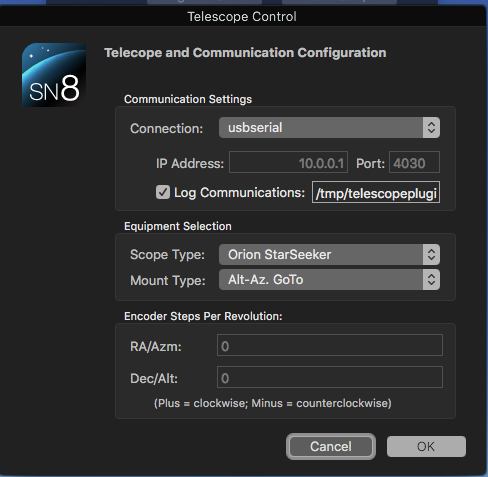
sn8 Telescope and Communication Configuration:

- Connection: usbserial

- Scope Type: Orion Starseeker

- Mount Type: Alt-Az. GoTo


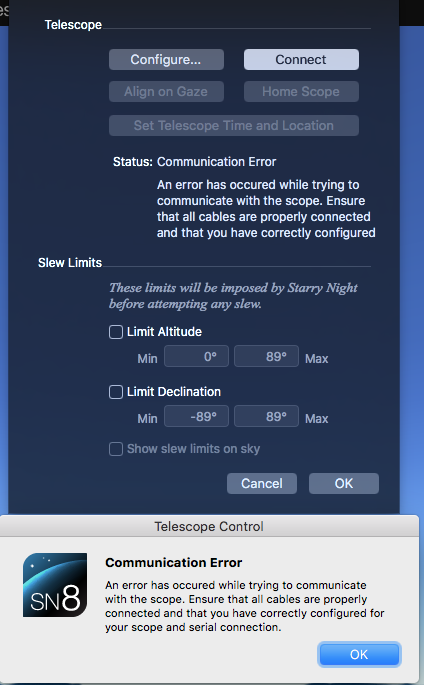
Im getting the following errors:

- "An error has occurred while trying to communicate with the scope. Ensure that all cables are properly connected and that you have correctly configured"

- The log says "Sent ASCII at 2020/03/08 12:22:51 with error 0:  Received ASCII at 2020/03/08 12:22:54 with error -13:"


I purchased StarSeeker for just this purpose, and cannot find any clues in the forums to help me continue to troubleshoot. I've tried all of the obvious, powercycle, reinstall drivers, and I've even tried on another, newer macbook PRO without success. 

Any help would be great, this software is totally worth the price, but only if it can control my scope obviously. 

Thanks in advance!

9 comments

  • 0
    Avatar
    Keiron Smith

    Aaron,

    Please attach screenshots of the following:

    • View > Show Telescope Setup > Configure > Telescope Control (Panel)
    • The error message

    Please also try a different USB-to-Serial Cable.  Why are you using the Prolific driver with the Orion cable?  I'm going to suggest that the Prolific macOS USB-to-serial driver installed is the likely source of this issue.

    On your "...newer macbook PRO without success" what macOS, what USB-to-Serial driver, what error message (still the same)?

    Also, have you aligned your scope BEFORE trying to connect?  You must.

    Thanks! 

  • 0
    Avatar
    AARON FIGG

    Hi Kieron, 

    Yes I have been aligning the scope before all my troubleshooting steps. Below is a screenshot of the config, error, and driver details. The prolific driver is the driver provided by Orion for the cable I purchased, see here: https://www.telescope.com/catalog/product.jsp?productId=102559 so I'm not sure what other driver I should be using. 

    Regarding the other "newer mac" it is using the same software, driver, and setup with the same error message. 

    I've also tried removing the drivers and reinstalling them, thinking it was a bad install. Thoughts?

  • 0
    Avatar
    AARON FIGG

    FYI, I've also contacted Orion support - so please pause on your troubleshooting until I have a chance to hear back from them, will let you know.

  • 0
    Avatar
    Keiron Smith

    You did not say what the newer macOS is.

    Will wait for the Orion feedback.

    Thanks!

  • 0
    Avatar
    AARON FIGG

    Hi Keiron,

    The newer macOS is 10.15.2. Orion's tech support had me install a new driver to see if the problem went away - pl2303hxd_g_driver_v2_0_0_20191204. The issue still remains. I've uninstalled, and reinstalled everything fresh as of this point on the newer mac. Any other ideas from your end?

    Thanks,

    Aaron Figg

  • 0
    Avatar
    AARON FIGG

    Hi Keiron, 

    I've also tried this on a windows machine. I hate to say it but I'd like to request a refund please. 

    Please advise,

    Aaron  

  • 0
    Avatar
    Keiron Smith

    Hi Aaron, 

    I think you should consider trying another RS232 cable.  You purchased:

    - Orion 5222 Intelliscope to PC RS-232 Connector Cable

    This is for an Intelliscope mount.  Your StarSeeker is not an Intelliscope mount.  There is a different RS232 cable for non-Intelliscope mounts, which we sell here:

    https://store.simulationcurriculum.com/collections/scope-control/products/telescope-serial-cable

    We also sell SkyFi 3, $75 off a the moment, and that is the best price ever.

    https://store.simulationcurriculum.com/collections/scope-control/products/skyfi-iii-wireless-scope-control

    You could try that setup, on macOS, and if it doesn't work return SkyFi 3 and the Orion RS232 cable for a refund.

    If you want a refund for SN8, I will make that happen, not to worry.

    But, I think this may just be about your RS232 cable purchased from Orion.

    Thanks for your patience waiting for a reply.

  • 0
    Avatar
    AARON FIGG

    Thanks Keiron, I just ordered the cable you suggested and will give that a shot! Thanks again for all the continued support!

  • 0
    Avatar
    AARON FIGG

    Hi Keiron, so sorry for the late update. Unfortunately I am still having issues and would like to request a refund. Please let me know next steps.

  • 0
    Avatar
    AARON FIGG

    Hi Keiron,

    I’ve tried and tried and think it’s time to move on. Can I get a refund for the software? I’ll keep the new cable and give it to a friend.

    Thanks for trying.

Please sign in to leave a comment.