This issue is driving me a bit crazy (as is the need to post to community forum about something that is clearly a bug). I have Sky Safari 7 Plus on my iPad and iPhone. I use it primarily when I am the Session Director on the Mt. Wilson Observatory 60" telescope to provide additional information to clients on the objects that they are seeing. I discovered a very strange problem on the iPad that I cannot duplicate on the iPhone. When I search for an object, the constellation (and often distance and other information is wrong). This occurs for ALL objects. As an example, when I search on NGC 6543 (Cat's Eye nebula in Draco), listing says "Cat's Eye Nebula Planetary Nebula in Ursa Major". The descriptive text is correct "The magnificent planetary nebula NGC 6543 in Draco is also known ...". The distance on the iPad is listed as 1.3 kpc, 4.3 kly. On the iPhone, the correct distance of 960 pc, 3100 ly is shown. If I then search for "Epsilon Lyra" (on the iPad), it says it is a Double Star in Cancer (the body text correctly says Lyra), and the distance is suspiciously 960 pc, 3100 ly (the correct value for NGC 6543 whereas the Double-Double is about 160 ly). I have uninstalled the app and reinstalled, same problem. My online searches have been to no avail. Can anyone tell me what is going on and how to fix this? If the problem was confined to my iPhone, rather than my iPad I could live with it, but as it is, I am finding little value with app. I really don't need the features of Sky Sarfari Pro, I wanted the extended Plus database and for the app to display correct information!
Date
Votes
11 comments
-

Keiron Smith Official comment DevOps reference: https://starrynight.unfuddle.com/a#/projects/7965/tickets/by_number/4234
-
Keiron Smith Hi David,
I can not reproduce the issue(s) as stated.
Please attach screenshots for each object's data and description as seen on each of your iOS devices.
Please also provide the following for each iOS device:
- SS7 App(s) and version(s)
- iOS versions
- Device makes and models


Thanks!
-

David Hasenauer Hi Keiron,
Thanks for the quick response. What you show above is what I see on my iPhone (but not on my iPad). As it turns out, one thing that I had not tried previously and did about an hour ago was to revert to the factory defaults for the program. That resolved my issue (at least for now). I wish I had taken a screenshot showing the problem (which really is bizarre) but I had not. If it happens again, I will be sure to do so, and post a comment or new post. Here is the information that you requested (and I will repost if the problem occurs again):
Sky Safari 7 Plus 7.1.3 (1060); iPad Pro (10.5-inch); Software Version 15.6.1
For clarity, using YOUR SCREEN SHOT (which I will post in a 2nd comment, to avoid confusion), the two places indicated in red where the constellation is listed showed as "Ursa Major" when my iPad app was having its problem. The distance information was also incorrect. I should have looked closer at the magnitude & size to see if they were also in error, but I did not . Once again, for now, with the reset to the factory defaults, the app is working correctly on my iPad.
-
David Hasenauer THIS IS YOUR SCREENSHOT WITH THE AREAS THAT WERE SHOWING INCORRECT INFORMATION INDICATED IN RED. AGAIN, BY RESETTING TO FACTORY DEFAULTS I WAS ABLE TO RESOLVE THE PROBLEM (FOR NOW) ON MY IPAD, SO I CANNOT REPRODUCE THE PROBLEM TO TAKE SCREENSHOTS.

-
Keiron Smith An excellent result, David! We will take the wins any way we can!
Thank you for the report and let's follow up with this if you encounter the same issue again.
Also, having posted in the community forums other users can keep an eye out for what you have experienced.
-
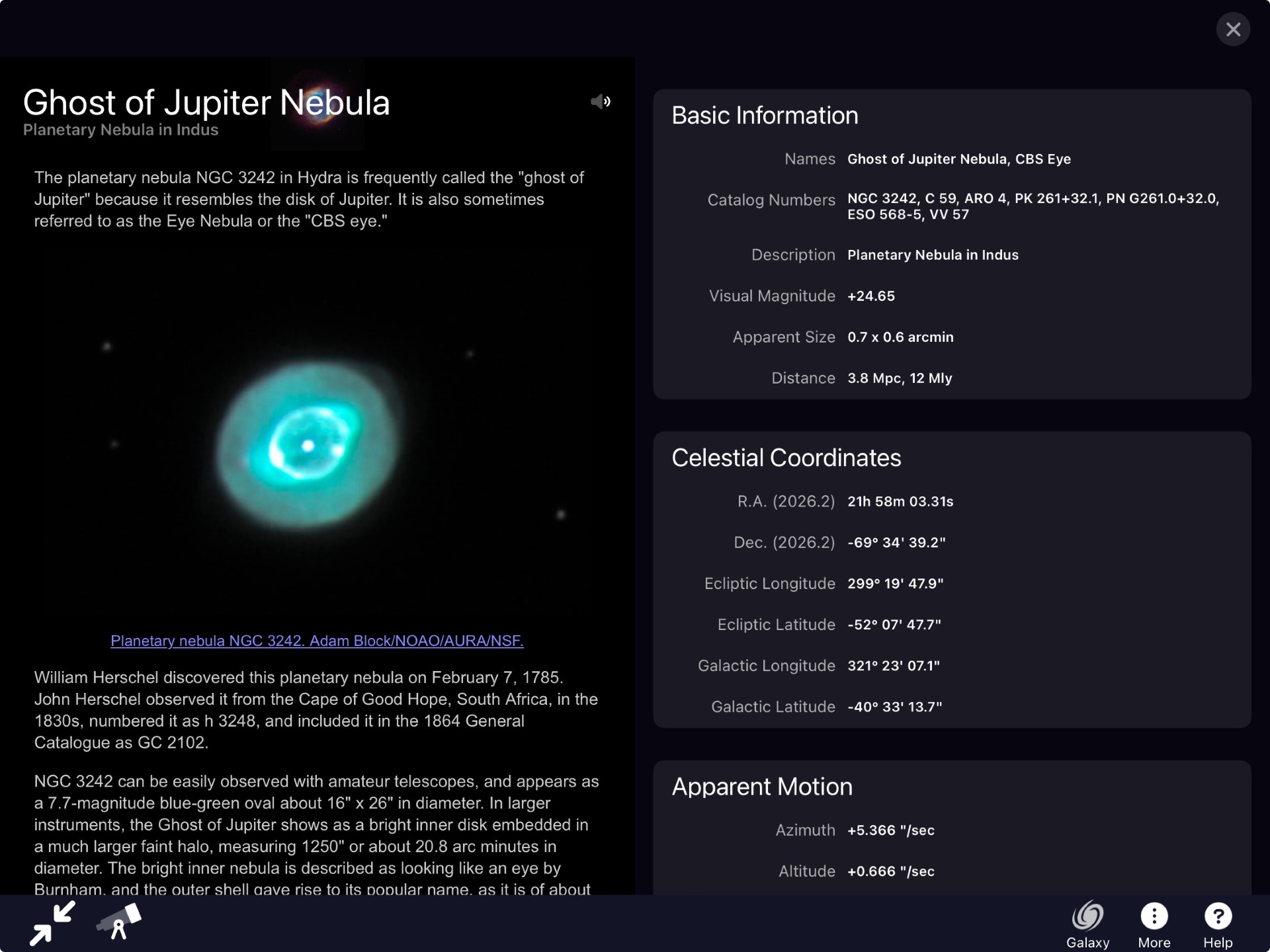
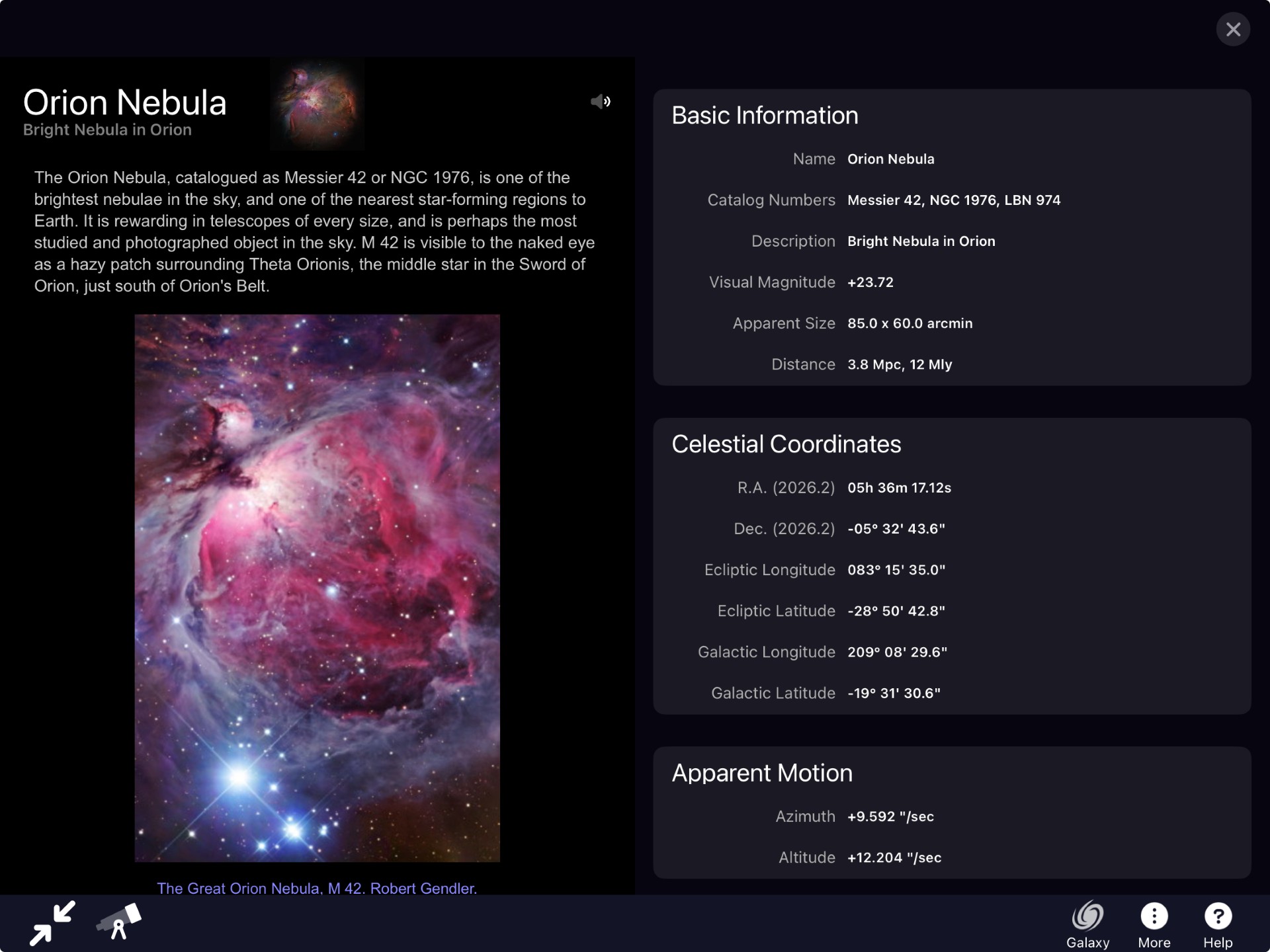
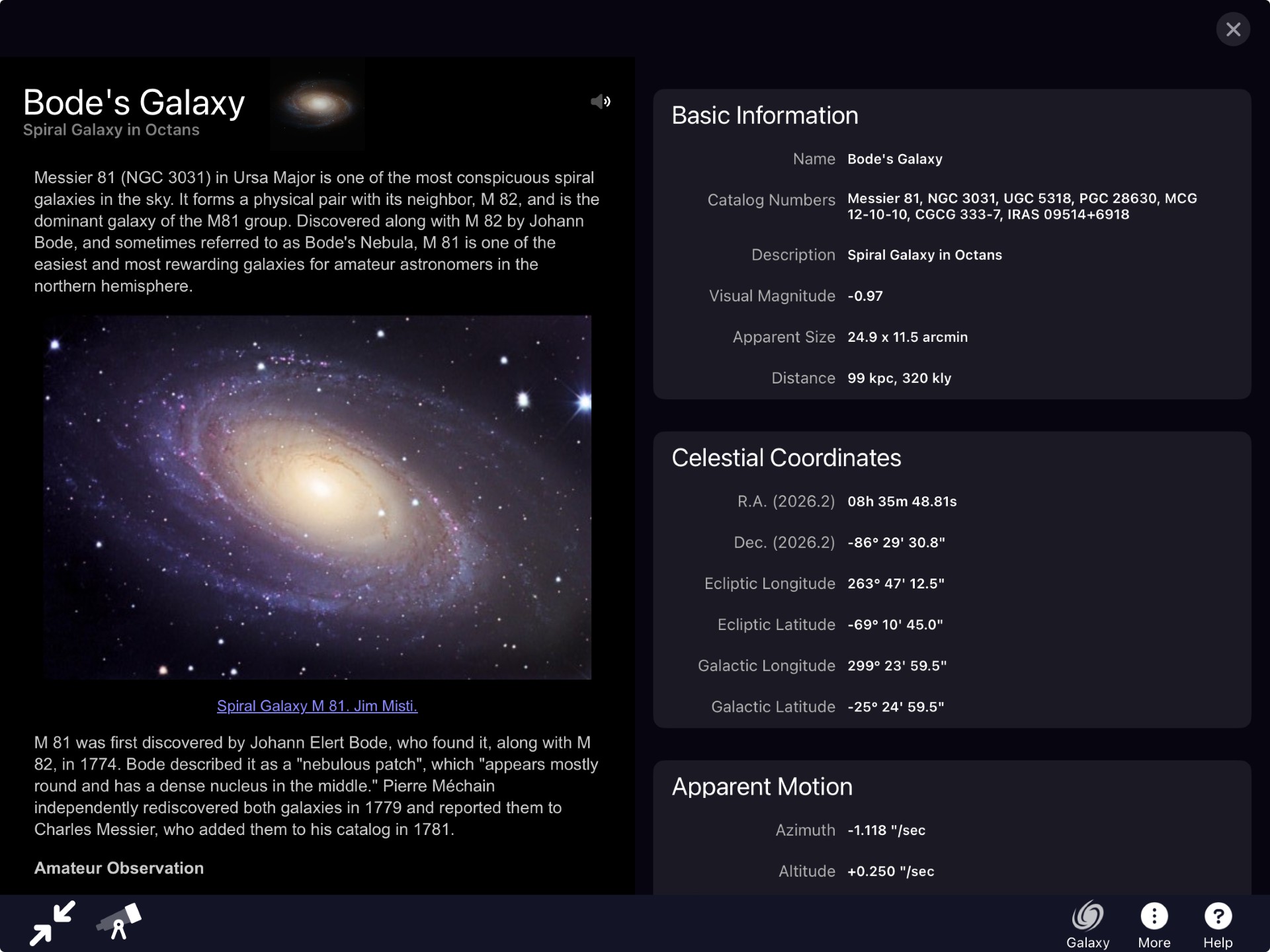
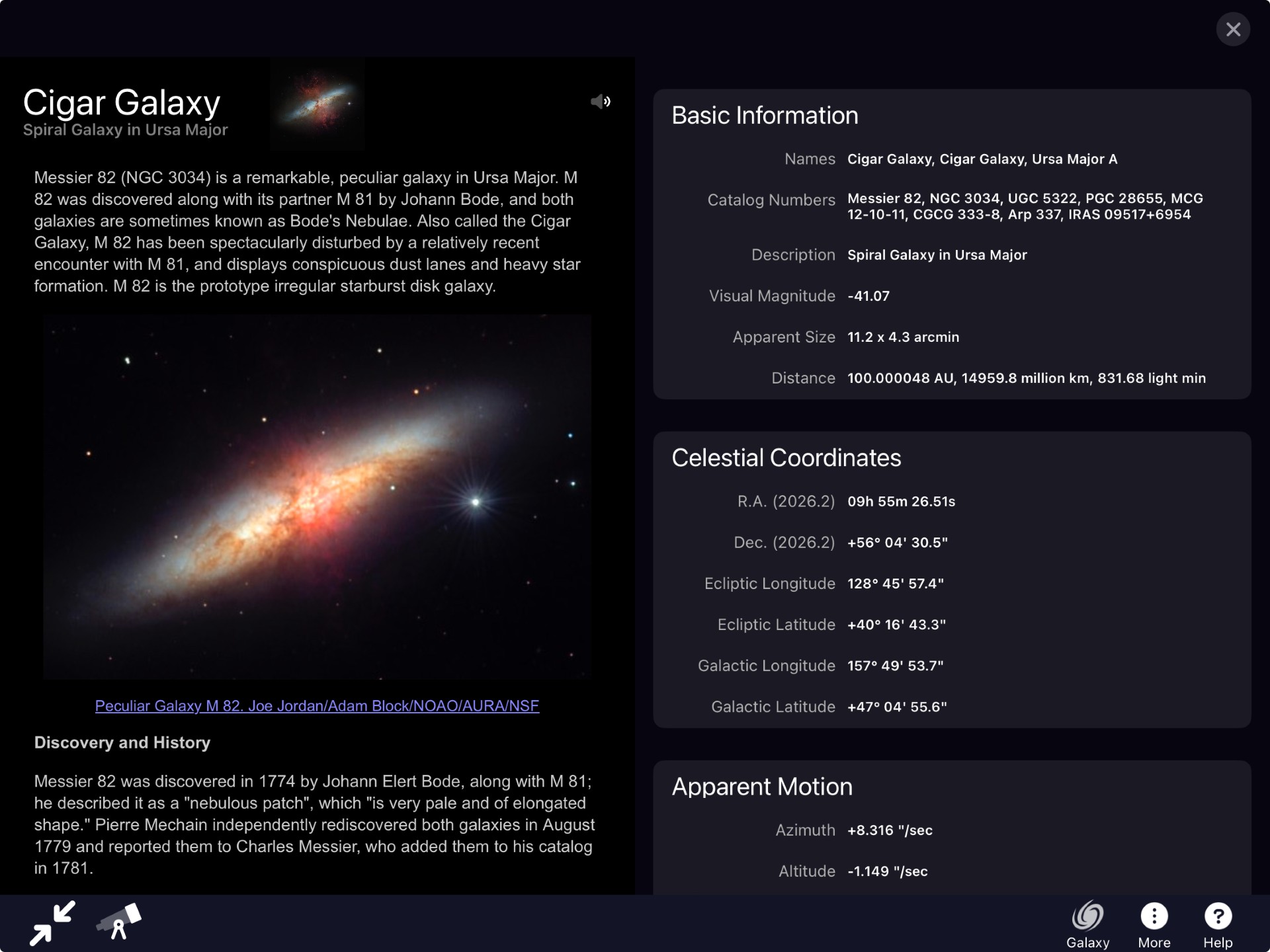
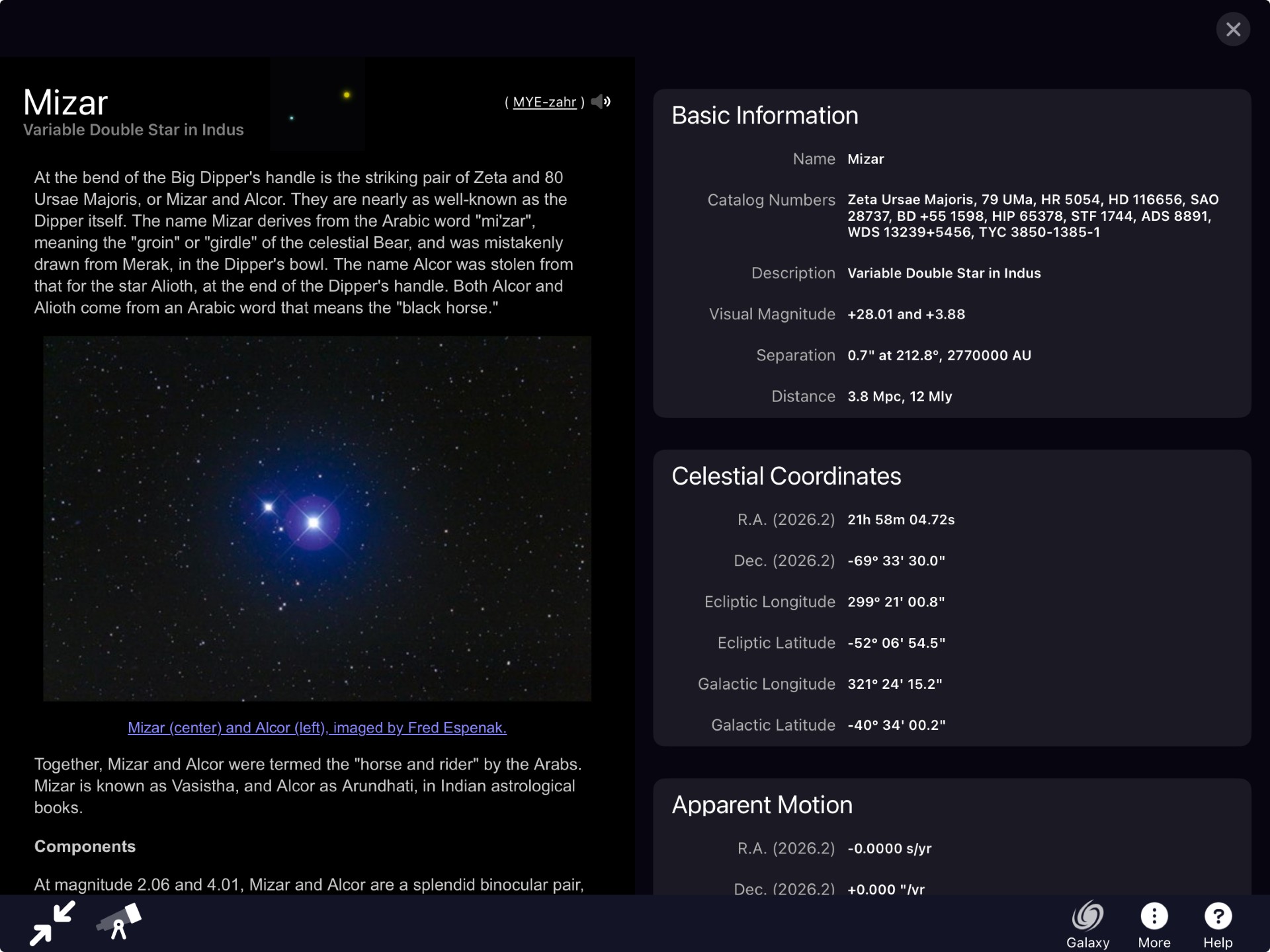
David Hasenauer Sadly, with the opening of Mount Wilson Observatory (MWO) for the 2026 season, the problem I reported is happening again. I have not found any way to make it reliable repeat, but, attached are several screenshots showing the issue. This problem only happens with my iPad Pro, not on my iPhone. My Ipad Pro is running OS version 17.7.0, and I am running SkySafari 7 Plus 7.6.6 (1171). At MWO, I mainly use SkySafari "Search" capability for objects that we have already pointed the 60" telescope to, and then to display the information pages on it. I then "X" out of it, and go back to "Search" for the next object. I very rarely click o the "Center" information to view the object position on a star map, or to use other features. After doing this for several objects where all the information appears correct, at some point some information appears corrupted. The most obvious errors are the constellation, distance, visual magnitude and the celestial coordinates. The distance values displayed appear to be values picked up from prior object searches, but the constellation corruption (including celestial coordinates) appears random, often picking up far south constellations/declinations that did not correspond to any object in my prior searches. Last night, my search order was: M42, M35, NGC 2158, NGC 2392, Iota Cancri, M81, M82, NGC 3242, Algeiba, and Mizar. Somewhere after M81, the information became corrupted. However, if I revisit an object I had searched on earlier, its visual magnitude & distance information can be corrupted, BUT the correct constellation and coordinates appear to be preserved (e.g., see screenshot for M42). However, after the initial corruption happens, then all new object searches seem to have their constellation and coordinates corrupted. Here are screen shots for Mizar, Jupiter's Ghost (NGC 3242), M81, M82, and M42. I was able to resolve my issue last time (apparently temporarily) by resetting the program to factory defaults. I will hold off on doing that now in case you want me to try anything with my Sky Safari in its corrupted state. While after resetting I cannot seem to reliably reproduce the problem, the corrupted state appears to persist until I reset to factor defaults. Please let me know as soon as possible if there are any experiments you wish me to try
-
Keiron Smith HI David,
Settings > Solar System > Update Minor Body Orbit Data
Does that resolve the issue?
Thanks!
-
David Hasenauer Unfortunately No. After doing the update, I went to Search, chose Mars (a new object that I had not queried at MWO), it’s constellation was Indus, visual mag +59.6, and 12 Mly distant.
-
Keiron Smith Developers are going to review your report.
Have you tried SS8 Pro yet?
-
David Hasenauer No, I have not sprung for SS8 Pro since I use Sky Safari in such a limited way. I am primarily a visual observer with a large Dob, and my preferred software for planning observing runs is Megastar 5.0. I do also have a Astro-Physics Apo (1980's vintage) at home on a AP GTO 900 mount, and Megastar can run that just fine. Megastar goes down to 15th magnitude which is perfectly adequate for my dark-sky Dob visual use, or my light-polluted 6" GoTo use. I have been using Megastar for over 30-years so my workflow and efficiency with it is pretty seamless! With all that said, I do need to look into SS8 Pro features again as I recently purchased a Pegasus SmartEye (mainly to try to do some deeper sky visual work from my light polluted home location)
-
David Hasenauer Also, I did get an email on the DevOps reference: DevOps reference: https://starrynight.unfuddle.com/a#/projects/7965/tickets/by_number/4234 Is there something I need/should do with this. I don't believe I have Unfuddle sign in credentials.
Please sign in to leave a comment.