New post
0

SkiFi 3 Connection Troubles

I recently purchased a SkyFi3 controller. I charged it up overnight and connected it to a Celestron NexStar SE which I'd already faux aligned, it's daytime after all. When I turn it on I can see the network (although the SSID is SkyFi instead of SkyFi 3 like the quick start claims) on my Android 11 device -- a Moto G Power. I then start up SkySafari 6 Pro and in the settings->telescope-> section I select "Connect via WiFi" and check "Auto-Detect SkyFi". It successfully finds the network, but then I cannot connect to the SkyFi Web Page from the button right there, nor can I get SkySafari to connect to the telescope. It just says it can't communicate with the device. I've also tried this with an old tablet running Android 5. On that I can see the web page from the SkyFi, but it won't connect to the scope.

  By contrast, if I join the SkyFi network from my desktop I can point my browser at 10.0.0.1 and immediately find the SkyFi status page. I've verified that it's using the latest firmware, but I haven't changed any settings yet. I've also tried to connect from Starry Night 8 (bundled version that came with the telescope). It also sees the network but refuses to connect. If I look at the log it says "Sent ASCII at <timestamp> with error 0: <CR> V# <CR> Received ASCII at <timestamp> with error -13: <CR>".

  I think I have a setting messed up somewhere, but I'll be switched if I know where to look next. Any suggestions/pointers welcome.

9 comments

  • 0
    Avatar
    Keiron Smith

    Dan,

    What Telescope > ScopeType have you selected?  You must choose "Celestron Nexstar GPS/SLT/SE"

    What port do you have in the bottom of your hand controller?  Is it RS232 or USB?

    You must be connecting the SkyFi 3 to the bottom of your hand controller.

    Thanks!


  • 0
    Avatar
    Dan Karmgard

    Hi Keiron,

      Thanks for the response. I've got Celestron NextStar GPS/SLT/SE as the telescope type, and Alt-Az GoTo as the mount type. The SkyFi is connected from the USB-A on the bottom of it to the mini USB port on the bottom of the hand controller. I'm on the SkyFi network (and SkySafari auto-detects it correctly). I get a connection failure telling me to make sure I've joined the WiFi network (I have) and the IP address is correct (it is).

  • 0
    Avatar
    Keiron Smith

    Dan, 

    Please attach a screenshot of the error message.

    Note, you must star-align your mount using the hand controller BEFORE trying to connect with SkySafari.  Are you aligning?

    Thanks!

  • 0
    Avatar
    Keiron Smith

    Just focus on SS6 Pro + SkyFi 3 on Android 11.  Thanks!

  • 0
    Avatar
    Dan Karmgard

    Hi Keiron,

      I am aligned. That is to say, I "align" the scope before I connect the SkyFi. But it's still light out so the alignment is just me telling the mount it's OK. As for focusing on SkyFi3 & Android 11, I am. But knowing that this isn't an issue with only this one mount or device is usefull information for troubleshooting.

  • 0
    Avatar
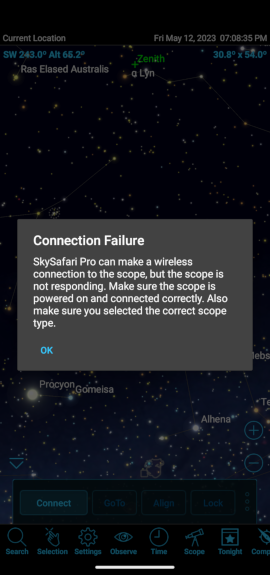
    Dan Karmgard

    For reference, here's a screenshot of the error message...

  • 0
    Avatar
    Keiron Smith

    At this point the issue must be your cable between the SkyFi 3 and the Celestron hand controller.

    Get Your Data Transfer USB-A-To-USB-Mini Cable For Celestron USB Mounts Here (Amazon Link Inside)

    The error message is saying SkySafari and the SkyFi 3 are communicating successfully, but the scope is not communicating.

    As you are aligned, the scope should be communicating.  So, the cable must be failing to deliver the data.

    Not all USB cables transmit data.

    Thanks!

  • 0
    Avatar
    Dan Karmgard

    It's not the cable exactly. I've used that cable to update the firmware on that mount (there's not too many mini-B devices anymore). I confirmed that it still transmits data just fine, and also an identical cable that I got in the same pack. When connecting the SkyFi3 however, it still failed. Just for fun I tried the AVX mount again, since it has the old-style RJ connector on the handset, and it worked like a charm. Then I tried a USB-A to DB-9 coupled to that DB-9 to RJ cable to test the USB-A connector on the SkyFi and it also worked. So the problem seems to be that cable with that USB-A jack. I'll poke around at work today and see if I can find a mini-B cable somewhere. Thank you for your help.

  • 0
    Avatar
    Dan Karmgard

    My apologies, I thought this one was put to bed. Since the problem is the connection between that cable and the SkyFi, the problem is solved from your end. I have to find a new cable that works. Thanks,

Please sign in to leave a comment.